
Duplicate RC Download | Parivahan Sewa, Application Status
A Registration Certificate (RC) is an essential document that confirms your vehicle’s legal registration with the Regional Transport Office (RTO) in India. It contains important details, including the vehicle registration number, chassis number, engine number, and registered owner’s information. If your RC gets lost, stolen, damaged, or becomes unreadable, you can apply for a duplicate RC download online or through your local RTO, as applicable. The duplicate Registration Certificate serves as a replacement for the original and holds the same legal validity, subject to applicable rules.
The correct process depends on your situation. If you only need an electronic copy, you can check DigiLocker or the mParivahan app. If your original certificate is lost, stolen, torn, or damaged, you may need to apply through the official Parivahan vehicle services portal.
This guide explains how to download RC online, apply for a replacement, prepare the required documents, check application status, and solve common problems.
Which RC Service Do You Need?
Before starting, identify the service that matches your situation.
| Your situation | What you should do |
|---|---|
| You need an electronic copy of your existing RC | Check DigiLocker or mParivahan |
| You lost your original registration certificate | Follow the official replacement procedure |
| Someone stole your RC | Follow the applicable police-reporting and replacement requirements |
| Your certificate is torn or damaged | Check whether you must surrender the damaged document |
| You have already submitted an application | Check the official application-status service |
| Your vehicle details do not appear online | Contact the relevant registering authority or RTO |
You can start with the official Parivahan Sewa website for government transport services.
What Is a Duplicate Registration Certificate?
A Registration Certificate is an official document that records the registration details of a motor vehicle. It connects the vehicle’s registration number with important information about the vehicle and its registered owner.
A Duplicate Registration Certificate serves as a replacement when the original certificate has been lost, destroyed, mutilated, torn, or become unusable. The replacement process differs from simply accessing a digital copy. A digital document may already be available through an authorized platform, while a replacement application may require supporting documents, payment, verification, or an RTO visit.
When should you apply?
You may need a replacement when:
- You have lost your original RC.
- Your registration certificate has been stolen.
- The document has become torn or unreadable.
- Your certificate has suffered damage that prevents normal use.
- The relevant transport authority instructs you to obtain a replacement.
The official Parivahan guidance identifies Form 26 as the application form for a replacement registration certificate. You should apply to the relevant registering authority and follow its requirements.
How to Apply for Duplicate RC Online?
You can apply for a duplicate Registration Certificate (RC) through the official Parivahan Sewa portal if your original RC is lost, stolen, damaged, or unreadable. The online process helps you submit your application, verify your vehicle details, and pay the applicable fees conveniently. Follow these steps to apply for a duplicate RC online:
- Visit the official Parivahan Sewa website.
- Select Vehicle Related Services from the available options.
- Choose your vehicle’s registration state from the list to access the relevant transport services.
- Enter your vehicle registration number and click Proceed.
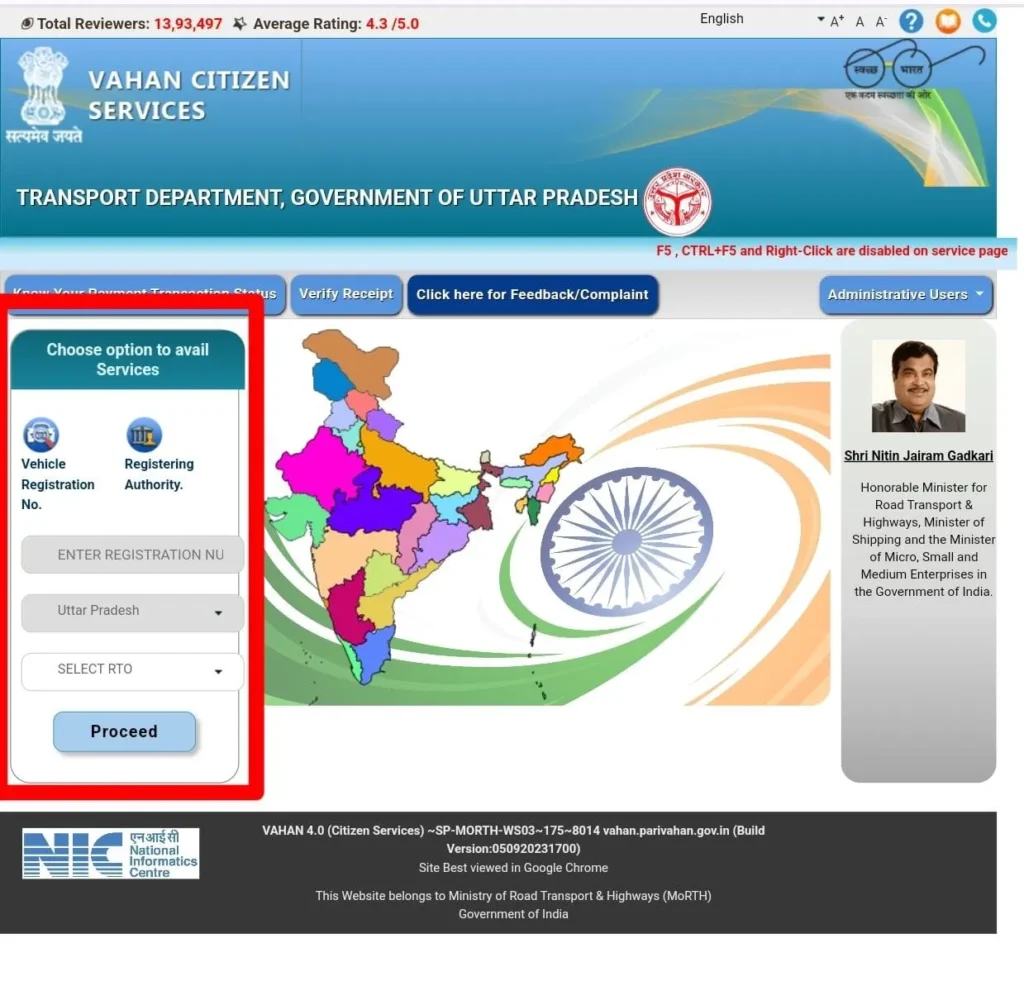
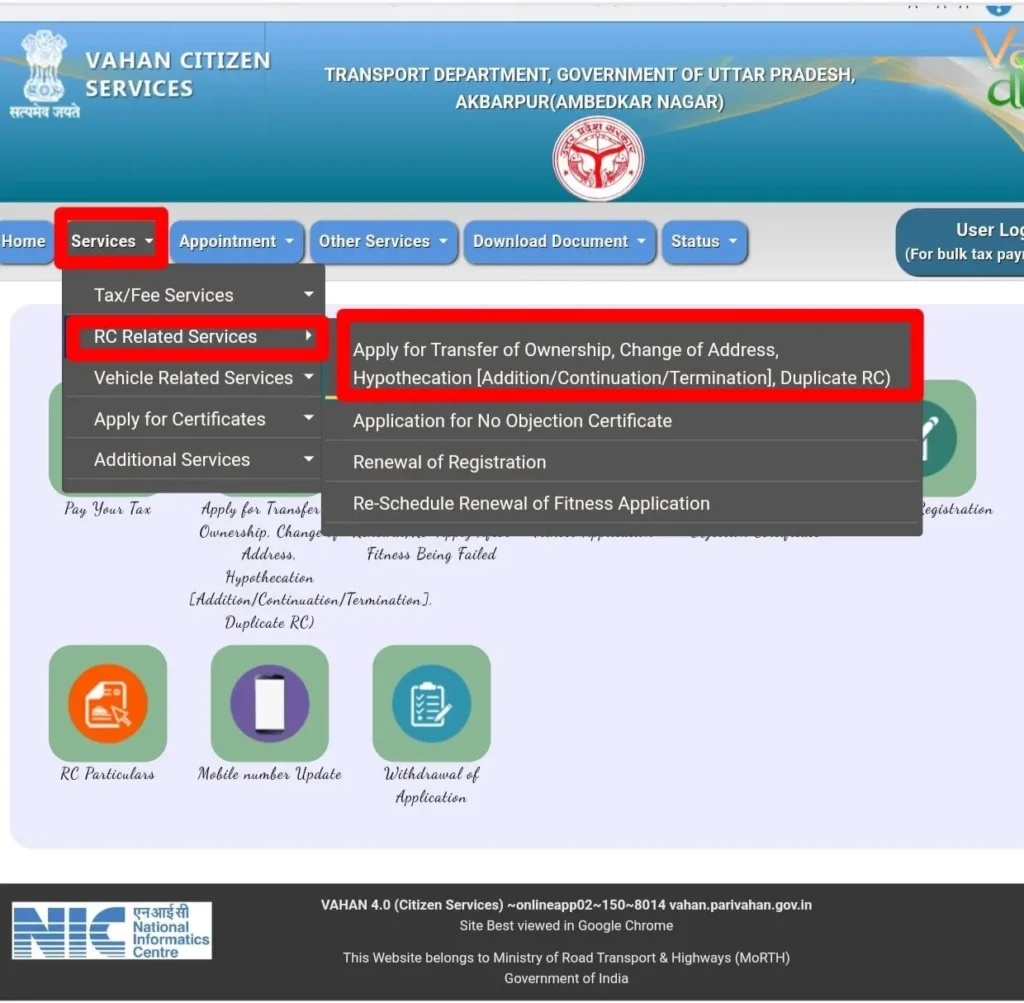
- Open the Services menu and select RC Related Services.
- Choose the Duplicate RC option from the available services.
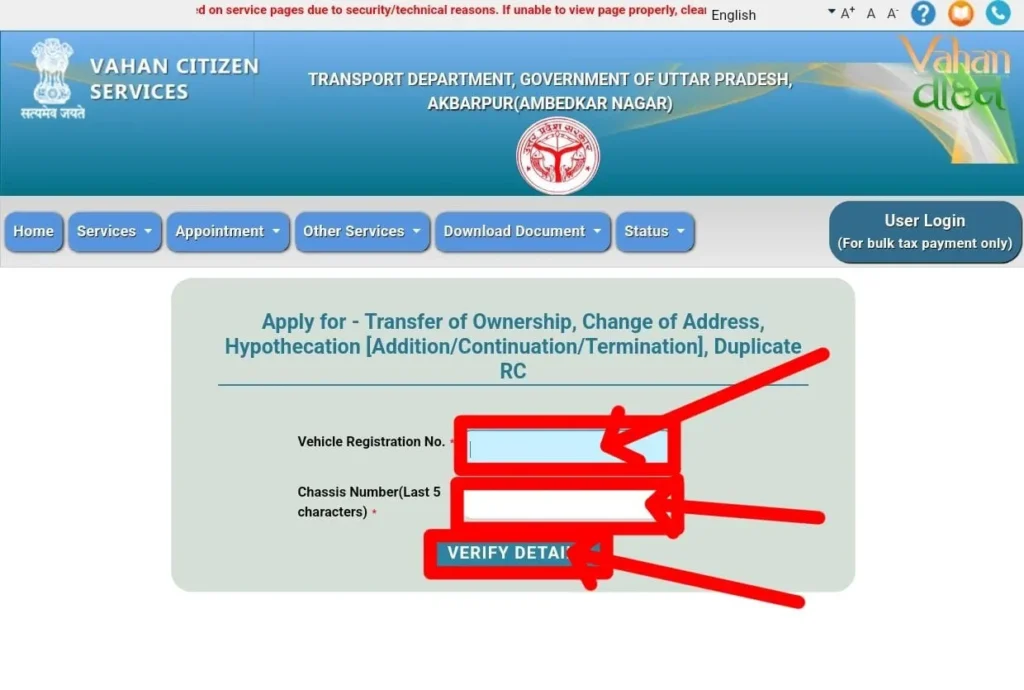
- Enter your vehicle registration number and chassis number, then click Verify Details.
- Add your Vehicle Registration Number and Chassis Number click on “Verify Details”.
- OTP send to your registered number verify it. Click on “Duplicate RC”.
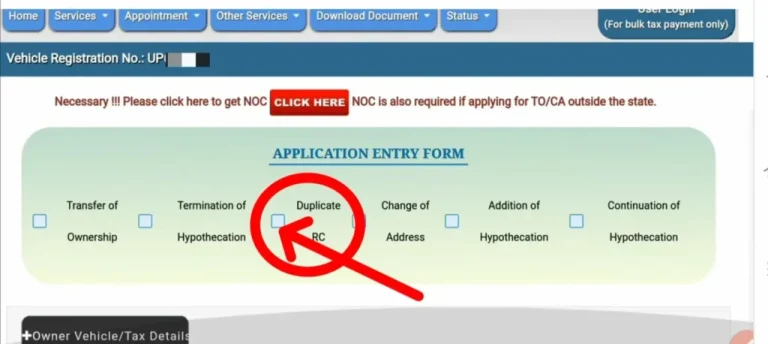
- Fill in the required information, including the vehicle owner’s details and the reason for requesting a duplicate RC.
- Upload the necessary documents, if requested, and pay the applicable fees using the available online payment methods.
- Review your application and click Submit to complete the process.
- Save your application reference number to track the status of your duplicate RC request.
Processing Time and RC Delivery
In many states, processing a duplicate RC application may take approximately 15 to 30 days, depending on the RTO and document verification process. Once the application receives approval, you may be able to access your digital RC through DigiLocker or the mParivahan app.
Depending on your state’s transport department, the RTO may also issue a duplicate RC smart card and deliver it to your registered address. Keep your application number and payment receipt safe so you can check your application status and resolve any delays.
Documents Required for a Duplicate RC
To apply for a duplicate Registration Certificate (RC) in India, you must provide specific documents to verify your identity, vehicle ownership, and registration details. The exact requirements may vary depending on your state’s transport department and the reason for requesting a duplicate RC. Here are the commonly required documents:
- Form 26: Complete Form 26 to request a duplicate Registration Certificate. You can download the form from the official Parivahan Sewa website or obtain it from your local RTO.
- FIR Copy (For Lost or Stolen RC): If your RC is lost or stolen, you may need to submit a copy of the police complaint or FIR, as required by your RTO.
- Affidavit or Declaration: Some RTOs may ask you to provide an affidavit explaining how you lost or damaged your original RC.
- Identity Proof: Submit a valid government-issued identity document, such as an Aadhaar card, PAN card, passport, or voter ID.
- Address Proof: Provide proof of your current address, such as an Aadhaar card, passport, electricity bill, or bank statement, if required.
- Vehicle Insurance Certificate: Keep a valid motor insurance certificate ready if the RTO requires it for your application.
- Pollution Under Control (PUC) Certificate: Submit a valid PUC certificate where applicable.
- Challan Clearance: Clear any outstanding traffic challans if required by the transport department.
- Road Tax Payment Receipt: Some RTOs may request proof of the latest road tax payment.
- No Objection Certificate (NOC): An NOC may be necessary in certain cases involving interstate registration or other specific registration requirements.
- Chassis Number Imprint: Your RTO may request a physical chassis number imprint to verify the vehicle’s identity.
- PAN Card or Form 60: Provide a PAN card or the applicable declaration form if required for the transaction.
- Original RC Details or Copy: If you have a damaged RC or a photocopy of the original certificate, keep it available for verification.
- Vehicle Owner’s Passport-Size Photograph: Some RTOs may require a recent photograph of the registered owner.
- Authorization Letter (If Applicable): If someone submits the application on your behalf, the RTO may request an authorization letter and the representative’s identity proof.
Checking the Status of Your Duplicate RC Application
After submitting your duplicate Registration Certificate (RC) application, you can track its progress online through the official Parivahan Sewa portal. Checking the application status helps you find out whether your request is pending, under verification, or approved. Follow these steps to check your duplicate RC status:
- Visit the official Parivahan Sewa website.
- Navigate to Online Services and select Vehicle Related Services.
- Choose your vehicle’s registration state and click Proceed.
- Enter the required application details and complete the captcha verification, if prompted.
- Click Submit to view your application status on the screen.
Keep your application reference number handy, as you may need it to check the latest updates. If your application remains pending for an extended period, contact your local RTO for further assistance.
When Do You Need a Duplicate RC?
A duplicate Registration Certificate becomes necessary when your original RC is lost, damaged, destroyed, or otherwise unusable. Here are the common situations in which you may need to apply for one:
- Lost or Missing RC: Apply for a duplicate RC if you have misplaced your original certificate or cannot find it.
- Stolen RC: If someone steals your RC, report the incident to the police and follow your RTO’s requirements before applying for a replacement.
- Damaged RC: Request a duplicate if your certificate is torn, faded, or damaged, making important vehicle details difficult to read.
- Destroyed RC: If fire, flooding, an accident, or another incident completely destroys your RC, you can apply for a replacement.
- Unreadable RC Details: You may need a duplicate if the registration number, owner’s information, or other essential details have become illegible.
- Incorrect RC Information: If your RC contains incorrect details, such as the owner’s name, chassis number, or manufacturing year, contact your RTO to determine whether you need a correction or a replacement certificate.
What if your RC does not appear?
First, check that you entered the correct registration details. Your vehicle record may not be available, or the information in the transport database may need attention.
If the document remains unavailable, contact the relevant RTO or transport department. You may need to resolve a record mismatch before you can retrieve it.
Important: Accessing an existing digital document does not automatically complete a replacement application for a lost or damaged original.
Virtual RC versus replacement certificate
A virtual RC provides electronic access to vehicle registration information. An officially issued digital document may have a different status from a basic vehicle-information screen or an ordinary screenshot.
If you need a replacement because the original is lost or damaged, follow the replacement procedure separately.
The Ministry of Road Transport and Highways has issued guidance recognizing eligible electronic transport documents presented through DigiLocker and mParivahan. You can read the official explanation on the Press Information Bureau website.
Documents Required for a Replacement RC
Prepare your documents before starting the application. The exact checklist depends on the circumstances and the requirements of your registering authority.
| Document | When it may be required |
|---|---|
| Form 26 | Main application form |
| Police certificate or report | When the RC is lost or stolen, as applicable |
| Valid insurance certificate | Where required by the authority |
| Pollution Under Control (PUC) certificate | Where required |
| Address proof | Where required |
| Identity or signature identification | Where required |
| Affidavit or declaration | If the authority requires one |
| Chassis and engine number impressions | Where required |
| Financier consent | For applicable financed or hypothecated vehicles |
| Tax and challan clearance | Particularly for certain commercial vehicles |
| Damaged original RC | When the authority requires surrender of the damaged document |
The official Form 26 PDF is available through Parivahan.
What is Form 26?
Form 26 for duplicate RC is the prescribed application form used to request a replacement registration certificate.
Read the form carefully and provide accurate vehicle and applicant information. If the vehicle has a hire-purchase, lease, or hypothecation arrangement, check whether the financier must sign or provide consent.
Do not assume that every item in the table applies to every vehicle. The central guidance marks certain requirements as state-dependent, and local transport authorities may publish additional instructions.
Replacement RC Fees in India
The cost of replacing a registration certificate depends on the applicable rules, vehicle category, and the charges imposed by the relevant authority.
The central government’s guidance refers to the applicable fee under Rule 81 of the Central Motor Vehicles Rules, 1989. Additional service or delivery charges may also apply.
Special Cases You Should Know About
Vehicles with outstanding finance
If your vehicle remains under a hire-purchase, lease, or hypothecation arrangement, the financier may need to provide consent or sign the relevant form. Check the vehicle’s recorded finance status and the local authority’s instructions.
Commercial vehicles
Commercial vehicles may face additional checks involving tax payments, challans, permits, or fitness documents. Confirm the specific requirements for your vehicle category before submitting the application.
Older vehicles or missing records
Older registration records may not appear in the online system. If the portal cannot retrieve your details, contact the registering authority that holds the vehicle’s registration record.
Vehicles registered in another state
Your current address does not automatically determine which authority should issue the replacement. Start by identifying the vehicle’s registration authority and follow the applicable process for that record.
Is a Digital RC Valid in India?
Eligible electronic transport documents presented through authorized platforms such as DigiLocker and mParivahan receive recognition under the applicable government framework.
However, you should distinguish an issued digital document from an ordinary screenshot, an unverified PDF, or a basic vehicle-information page. These are not automatically equivalent.
For the relevant government guidance, see the Ministry of Road Transport and Highways announcement published by the Press Information Bureau.
If you need a replacement certificate, continue to follow the process prescribed by your registering authority even if you can access vehicle information digitally.
State-Wise Services and Local Requirements
Online procedures can differ between states and Union Territories. Some authorities provide more online steps, while others may require document submission or physical verification.
For the correct process:
- Identify the state where your vehicle is registered.
- Open the official Parivahan service or relevant state transport website.
- Check the current document checklist and fee instructions.
- Follow any local requirements for police documents, financier consent, or damaged certificates.
- Contact the registering authority if the portal does not support your application.
For example, the Haryana Transport Department publishes specific instructions for duplicate registration certificates, including verification and delivery information. Always check the latest details for your own state rather than copying another state’s timeline.
Frequently Asked Questions
Can I download a replacement RC online?
You may be able to submit the replacement application online through VAHAN where the service is available. The authority may still require verification or an office visit.
Can I get an RC without visiting the RTO?
Some applications can be completed online, but this depends on the state, the vehicle record, and the service available. Follow the instructions displayed by your registering authority.
What is Form 26 used for?
Form 26 is the prescribed application for requesting a duplicate registration certificate. You can obtain it from the official Parivahan website.
How much does a replacement RC cost?
The amount depends on the applicable fee rules, vehicle category, and local charges. Check the official portal before paying.
How long does the process take?
Processing times vary by authority and application. Verification, missing documents, and record problems can cause delays. Check the official status service for updates.