
eChallan online – Check Challan Status, Traffic Fine
Have you received a traffic challan and want to check its status online? The eChallan online Status Check service allows vehicle owners and drivers in India to view traffic fines, verify violation details, and pay eligible penalties through the official government portal.
The Ministry of Road Transport and Highways (MoRTH) provides digital traffic challan services through the Parivahan eChallan portal. You can check your challan using your vehicle registration number, challan number, or driving licence (DL) number.
Whether you need to verify a recent traffic violation, check pending fines, or confirm a previous payment, this guide explains how to check eChallan status online, pay traffic fines, resolve payment issues, and dispute an incorrect challan.
Check eChallan Status Online
Visit the official government portal to view your traffic challan details.
Official eChallan Portal: echallan.parivahan.gov.in
You may need your vehicle registration number, challan number, or driving licence number. Depending on your selected search method, the portal may also ask for additional verification details, such as your vehicle’s chassis or engine number.
What Is an eChallan?
An eChallan is a digital traffic violation notice issued by authorized traffic police or transport authorities when a driver breaks applicable traffic rules.
Unlike traditional paper challans, an eChallan is generated and recorded electronically. Authorities can issue it through traffic cameras, electronic surveillance systems, or handheld devices used by traffic officers.
An eChallan may include:
- Challan number and vehicle registration details
- Type of traffic violation
- Date, time, and location of the offence
- Applicable fine amount
- Payment status and other relevant information
The digital challan system makes it easier for authorities to record violations and helps drivers access their traffic fine information online.
You should check your eChallan status regularly to avoid missing payment deadlines or overlooking pending fines. Always verify the violation details before making a payment. Keep your payment receipt or transaction reference number as proof of payment.
How the e-Challan System Works
The process usually follows these steps:
- A traffic officer or an enforcement camera detects a traffic violation.
- The authorized system records the violation and creates a challan.
- The vehicle owner or driver can review the challan details online.
- The person responsible can pay the fine or follow the official grievance process if the challan is incorrect.
- The system updates the payment or disposal status.
The exact procedure may vary by state, department, and type of violation.
Benefits of Digital Traffic Challans
The online system offers several practical benefits:
- Check traffic fines without visiting an RTO.
- Review the offence, date, and location.
- Pay eligible fines through online payment services.
- Download a digital payment receipt.
- Track payment transactions and raise grievances.
- Keep a record of traffic challans associated with a vehicle or licence.
How to Check e-Challan Status Online
You can use the official Parivahan portal to check your e-Challan status. Keep your vehicle registration number, challan number, or driving licence number ready.
Check e-Challan by Vehicle Number
Follow these steps to check a traffic challan by vehicle number:
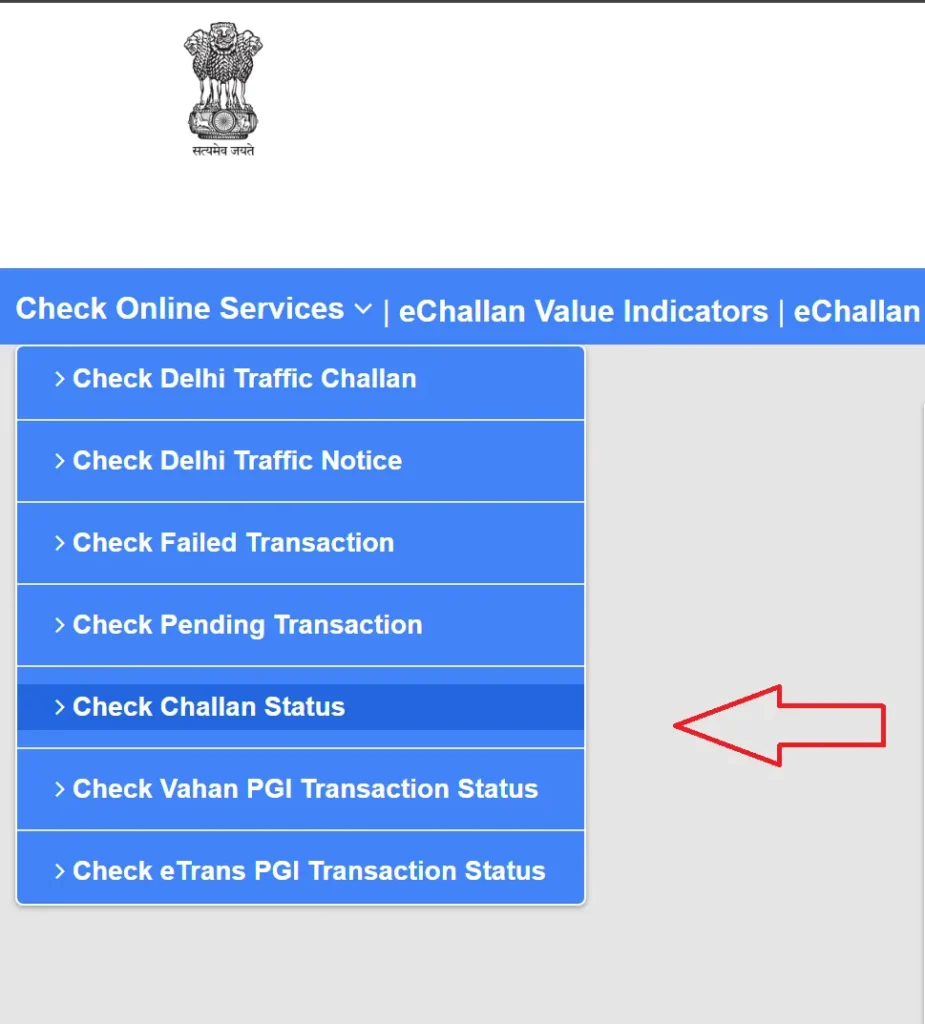
The results may show the challan number, date, amount, status, issuing department, and offence details. Select the relevant record to review more information.
If the portal does not show a challan, check the registration number for typing errors and try again. You can also check the relevant state traffic police portal.
Check e-Challan by Challan Number
If you received an SMS or paper notice containing a challan number, use it to find the specific record.
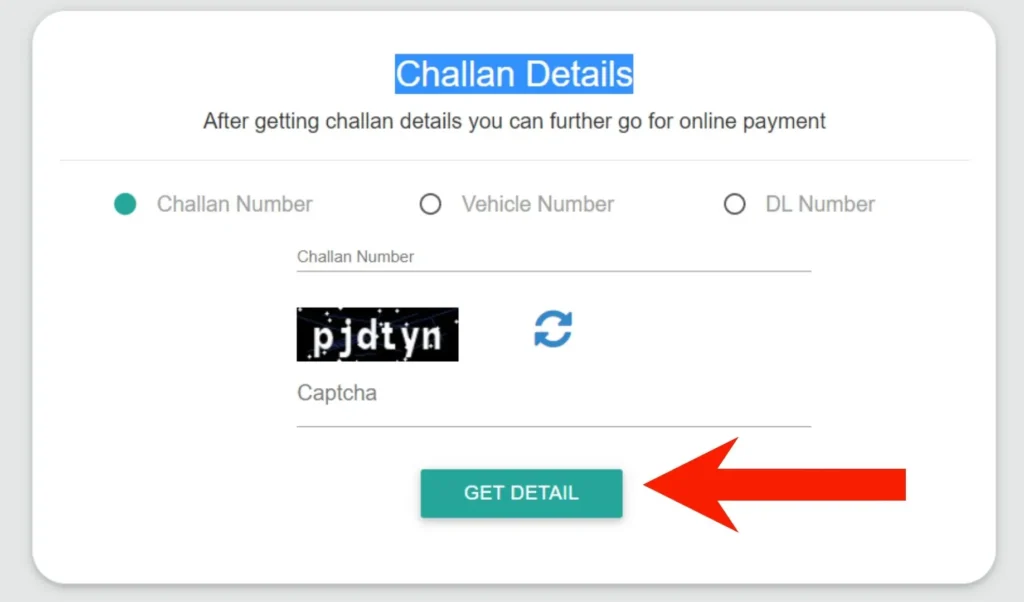
- Open the official e-Challan parivahan portal.
- Select the challan status or payment service.
- Choose the challan number option.
- Enter the e challan number from your notice.
- Complete the security verification.
- Submit the search and review the result.
- This method can help you find a particular traffic fine without searching through all challans linked to your vehicle.
Check e-Challan by Driving Licence Number
You can also search for challans using your driving licence number:
- Open the official portal.
- Select the driving licence search option.
- Enter your DL number accurately.
- Complete the CAPTCHA.
- Submit the details and review the results.
Use the same licence number format shown on your driving licence. If the search returns no record, verify the details or check with the relevant traffic authority.
How to Pay e-Challan Online
Once you confirm that the challan belongs to you and the details are correct, you can proceed with e-Challan payment.
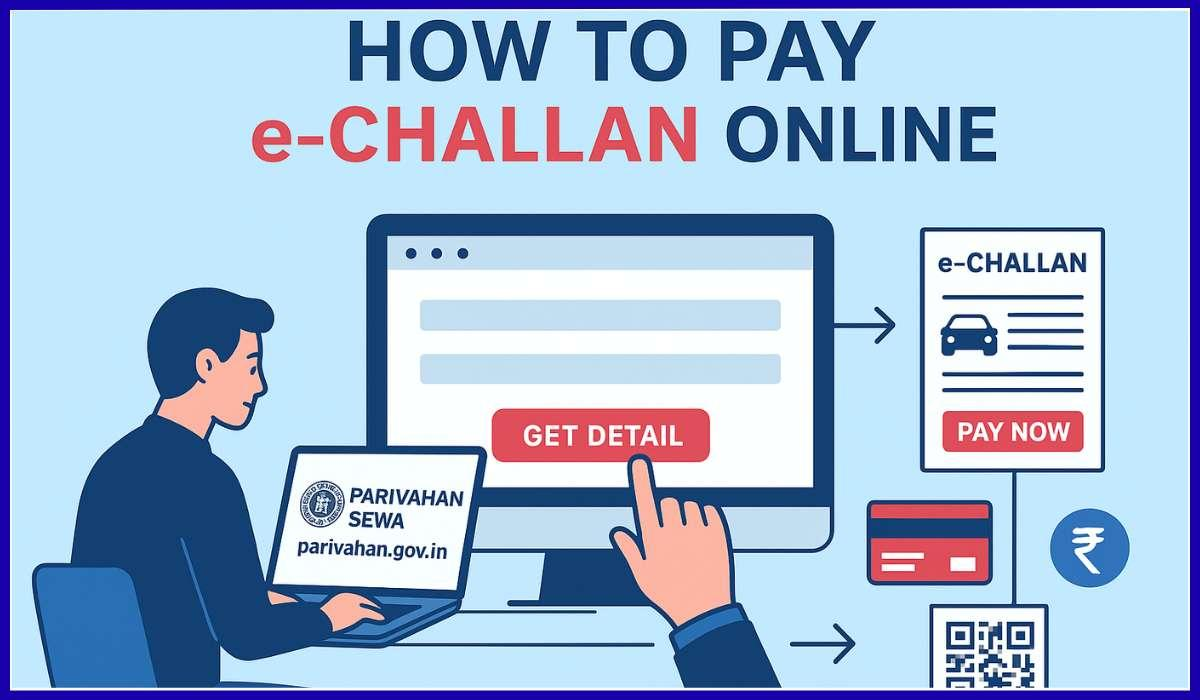
Payment Through the Parivahan Portal
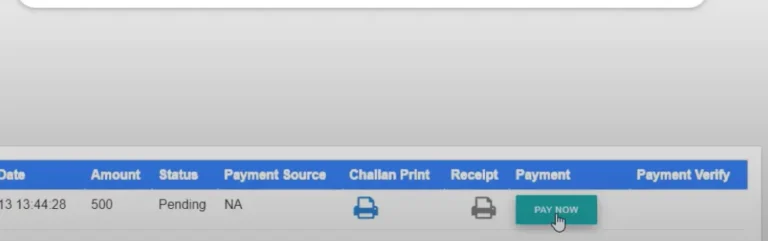
- Visit the echallan.parivahan.gov.in.
- Select “Check Pending Challan Status” or “Pay Challan.”
- Search using your vehicle number, challan number, or DL number.
- Review the offence details and fine amount.
- Select the payment option available for your challan.
- Follow the instructions on the payment gateway.
- Complete the transaction and save the confirmation details.
The portal may offer payment methods such as UPI, debit card, credit card, or net banking. Available options can vary.
Available Payment Methods
The official eChallan portal offers several payment options, depending on the payment gateway and your location. Common methods include:
- UPI
- Debit cards
- Credit cards
- Net banking
- Other payment options available on the official portal
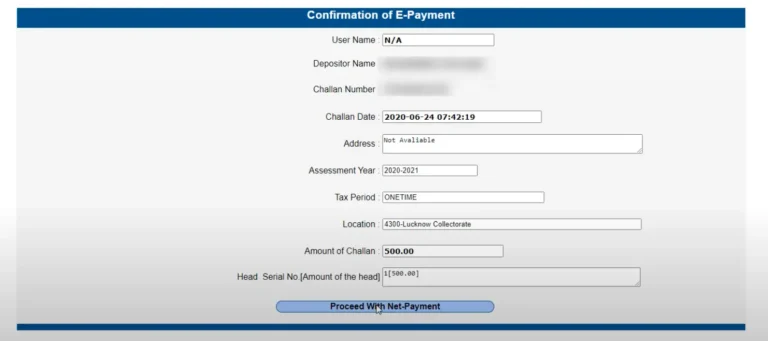
Before completing your payment, verify the challan details and the total payable amount. Save your payment receipt and transaction reference number for future reference.
- Check payment status: After paying, revisit the portal to confirm that your challan status has changed to “Paid.”
How to Check Whether a Payment Was Received
Review the challan record and look for a successful payment or disposed status. Then download the receipt if the portal makes it available.
If the payment status remains unclear, contact the official e-Challan helpdesk:
- Email: [email protected]
- Phone: 0120-4925505
Check the current contact details and service hours on the official portal before contacting support.
How to Pay eChallan Offline
If you cannot pay your traffic challan online, you may be able to settle it at an authorized traffic police office, Regional Transport Office (RTO), or designated payment centre.
Follow these steps to pay your eChallan offline:
- Visit the relevant traffic police office or an authorized challan payment centre.
- Provide your challan number, vehicle registration number, or driving licence details.
- Ask the officer to verify your challan details and outstanding fine amount.
- Pay the fine using the payment methods accepted at that location.
- Collect the official payment receipt and keep it for your records.
- Confirm that the receipt includes the challan number, payment amount, and transaction details.
- Check your eChallan status online after payment to ensure the system reflects the completed transaction.
Offline payment facilities and accepted payment methods may vary by state and location. Contact the relevant traffic authority before visiting to confirm the available services and required documents.
Traffic Rules and Challan Fines in India
The Motor Vehicles Act, 1988, as amended, establishes traffic rules and penalties in India. State-specific rules and government notifications may also affect the fines applicable to certain violations.
The table below lists common traffic offences and their typical penalties. The actual fine may vary depending on the nature of the violation, vehicle category, repeat offences, and applicable state regulations.
| Traffic Violation | Commonly Applicable Penalty |
|---|---|
| Driving without a valid licence | ₹5,000 |
| Driving without valid insurance | ₹2,000 for a first offence; ₹4,000 for a subsequent offence |
| Riding without a helmet | ₹1,000 |
| Not wearing a seat belt | ₹1,000 |
| Using a mobile phone while driving | Depends on the applicable offence |
| Over-speeding | Varies by vehicle category and applicable rules |
| Driving under the influence of alcohol | ₹10,000 for a first offence; ₹15,000 for a subsequent offence |
| Juvenile driving | ₹25,000 and additional legal consequences |
| Failing to give way to emergency vehicles | ₹10,000 |
| Driving without a valid pollution certificate | Penalty under the relevant provisions |
Important: This table provides general information and does not determine your actual liability. Always check the fine amount displayed on your official eChallan and confirm the applicable penalty with the issuing traffic authority. Certain violations may also result in licence suspension, vehicle impoundment, or court proceedings.
Important Things to Remember About eChallan
Keep these important points in mind when checking or paying your traffic challan online:
- Use the official portal: Check your challan details and make payments only through the official Parivahan eChallan website or other government-authorized platforms.
- Verify challan details: Review your vehicle number, violation details, date, location, and fine amount before making a payment.
- Pay fines on time: Clear pending challans promptly to avoid additional complications or legal action.
- Keep payment receipts: Save your transaction reference number and payment receipt as proof of payment.
- Check payment status: After completing a transaction, revisit the portal to confirm that your challan shows the correct payment status.
- Avoid fraudulent links: Do not share your banking passwords, UPI PIN, or OTP with anyone claiming to help you pay a challan.
- Dispute incorrect challans: If you believe a challan contains incorrect information, use the official grievance or dispute process to request a review.
- Check state-specific rules: Traffic penalties and payment procedures may vary across states, so confirm the requirements with the relevant authority.
Following these precautions can help you manage your eChallan payments safely, avoid unnecessary delays, and maintain accurate traffic records.
How to Dispute an Incorrect eChallan
If you believe a traffic challan was issued incorrectly, you can challenge it by submitting a grievance through the official eChallan portal or contacting the traffic authority responsible for issuing it. Reviewing the violation details and providing clear supporting evidence can help authorities investigate your complaint.
Step 1: Verify the Challan Details
Visit the official Parivahan eChallan portal and check your challan using your vehicle registration number, challan number, or driving licence number.
Carefully review the following details:
- Vehicle registration number and vehicle type
- Nature of the alleged traffic violation
- Date, time, and location of the offence
- Photographs or camera evidence, if available
- Fine amount and payment status
If you notice an incorrect vehicle number, duplicate challan, or inaccurate violation details, gather evidence before submitting your complaint.
Step 2: Collect Supporting Evidence
Prepare documents and evidence that support your objection. Depending on your situation, these may include:
- Photographs or dashcam footage showing the actual circumstances
- Vehicle Registration Certificate (RC)
- Driving licence
- GPS records or travel history
- Parking tickets or toll receipts
- Proof that you sold the vehicle before the violation date
- Evidence of a cloned or fake number plate
- Payment receipts if the challan has already been paid
Make sure your evidence is clear, relevant, and relates directly to the disputed challan.
Step 3: Submit a Grievance Online
Follow these steps to raise your complaint:
- Open the official eChallan portal.
- Select the grievance or complaint option.
- Enter your challan number and complete any required verification.
- Choose the appropriate complaint category, if available.
- Explain why you believe the challan is incorrect.
- Upload supporting documents if the portal allows attachments.
- Submit your grievance and save the complaint or e-ticket reference number.
The available grievance options may differ depending on the state and the authority that issued your challan.
Step 4: Contact the Issuing Traffic Authority
If you cannot submit your complaint online, contact the traffic police department or transport authority listed on your challan.
When contacting the authority, provide your challan number, vehicle registration number, a clear explanation of the problem, and copies of your supporting evidence.
For technical problems with the national eChallan portal, you can contact:
- Email: [email protected]
- Phone: 0120-4925505
Check the official portal for the latest contact details and service hours.
Step 5: Track Your Grievance
After submitting your complaint, use the grievance status or e-ticket tracking option on the portal to monitor progress.
Keep your complaint reference number, submitted documents, and any communication from the authorities. If the review takes longer than expected, follow up with the issuing authority.
Step 6: Attend Court if Required
If your challan has been referred to court or the authority directs you to contest it through judicial proceedings, follow the instructions on the official notice.
Bring your challan, identification, vehicle documents, supporting evidence, and grievance records to the hearing. If necessary, seek legal advice about your options.
Tips to Avoid Traffic Challans
Following traffic rules helps you avoid unnecessary fines, protect yourself and other road users, and maintain a clean driving record. Here are some practical tips to reduce the risk of receiving a traffic challan in India.
- Follow speed limits: Always observe posted speed limits and adjust your speed according to road conditions, weather, and traffic.
- Wear a helmet or seat belt: Wear a BIS-approved helmet when riding a two-wheeler and ensure all occupants wear seat belts in a car.
- Carry valid documents: Keep your driving licence, vehicle registration certificate (RC), insurance, and pollution under control (PUC) certificate valid and accessible.
- Avoid using your phone while driving: Do not make calls, text, or operate your phone while driving. Stop safely before using your device.
- Obey traffic signals: Stop at red lights, follow lane markings, and respect road signs and traffic instructions.
- Never drive under the influence: Avoid driving after consuming alcohol or intoxicating substances.
- Maintain your vehicle: Check your brakes, lights, indicators, tyres, and number plates regularly to ensure your vehicle meets legal requirements.
How to Identify Fake e-Challan Messages and Websites
Scammers sometimes send fake traffic fine messages that direct users to fraudulent payment pages. These pages may imitate government websites to steal money or personal information.
Protect yourself by following these precautions:
- Open the official portal by typing its address yourself or using a trusted bookmark.
- Check the website domain carefully.
- Do not click suspicious payment links in SMS messages or emails.
- Never share your OTP, banking password, or card PIN with anyone.
- Do not install an unknown app to pay a challan.
- Verify the challan independently on the official portal.
The official e-Challan portal warns users about fraudulent websites and apps. It states that authorities do not request passwords, OTPs, or sensitive payment details through suspicious calls, emails, or messages.
Frequently Asked Questions
How can I check my e-Challan online?
Visit the official Parivahan e-Challan portal and search using your vehicle registration number, challan number, or driving licence number. Complete the security verification to view available records.
Can I check an e-Challan using only my vehicle number?
Yes. Select the vehicle number search option on the official portal, enter your registration number, and complete the verification. The portal may request additional information.
How can I check my traffic challan using my driving licence?
Choose the DL number search option, enter your driving licence number, complete the CAPTCHA, and submit the search.
How do I pay an e-Challan online?
Find your challan on the official portal, review the offence and amount, select the payment option, and follow the payment gateway instructions.
Can I check challans from different states?
The central portal supports many states and union territories. Some states also maintain separate services, so check the official portal of the issuing authority if a challan does not appear.
How do I identify a fake e-Challan SMS?
Do not follow suspicious payment links. Verify the challan independently through the official government portal and never share OTPs or banking credentials.
Final Words
The official e-Challan service makes it easier to check traffic fines, pay eligible challans, download receipts, and raise grievances online. By using the correct government portal and verifying each transaction, you can manage your traffic challans more confidently.
Check your challan details carefully, keep proof of payment, and use official channels whenever you need help.