
Driving Licence Check Online – Check DL Details, Status & Validity
Do you want to verify your driving licence check online details, check its expiry date, or track a pending application? You can complete these tasks online through India’s official transport services.
The Ministry of Road Transport and Highways (MoRTH) provides digital services through Parivahan and Sarathi. These portals help you retrieve licence information, track applications, and access other driving licence services without visiting the Regional Transport Office (RTO) for every enquiry.
This guide explains how to check your licence details, understand your status, download a digital copy, recover a lost application number, search for an existing DL using your licence number, find your licence details using available search options and resolve common problems.
How to Check Driving Licence Details Online in India
You can use the official Parivahan portal to verify an existing driving licence. Keep your licence number and date of birth ready before you begin.
Open the official Parivahan portal
Visit the Parivahan Sewa website. Look for the driving licence information or licence status service. You can also visit the official licence details service through the National Government Services Portal.
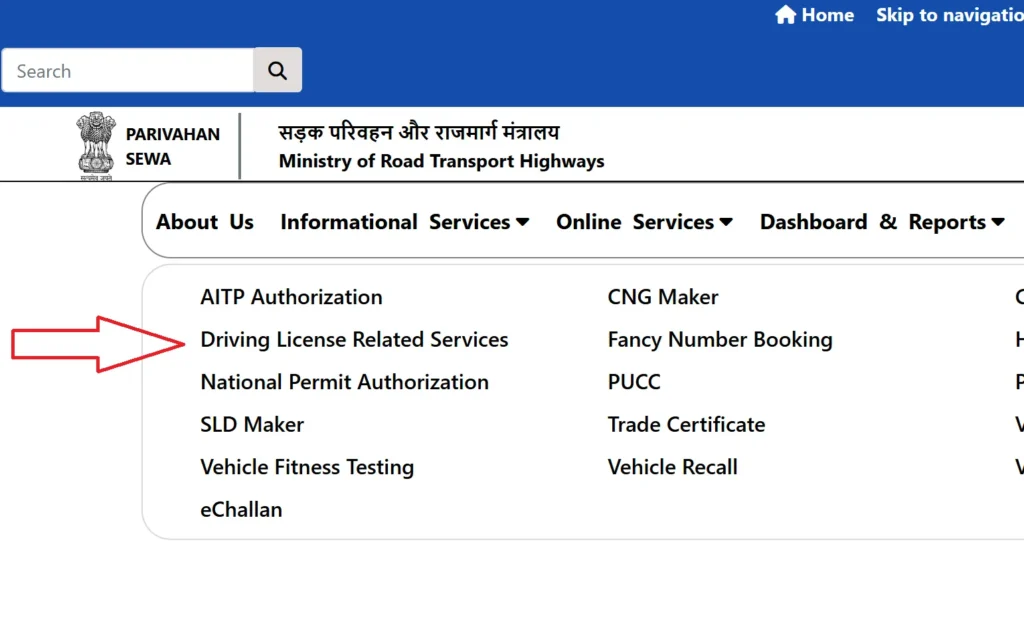
Enter your driving licence number
Enter your Driving Licence Number in the format requested by the portal.
If you have an older licence, the system may require a standardised number format. Check the instructions displayed on the official service before changing your number.
Click on Application Status
On the state-specific page, select Application Status from the available options.
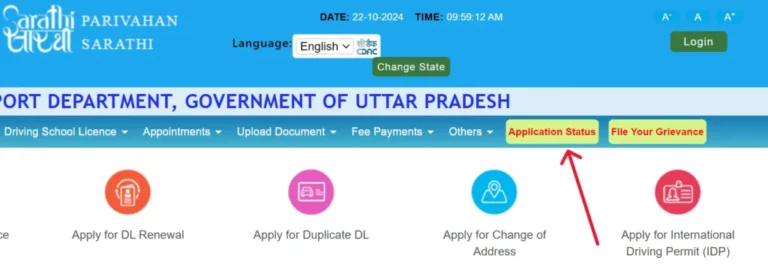
Enter your date of birth
Select your date of birth using the date picker. Make sure it matches the information recorded in your licence.
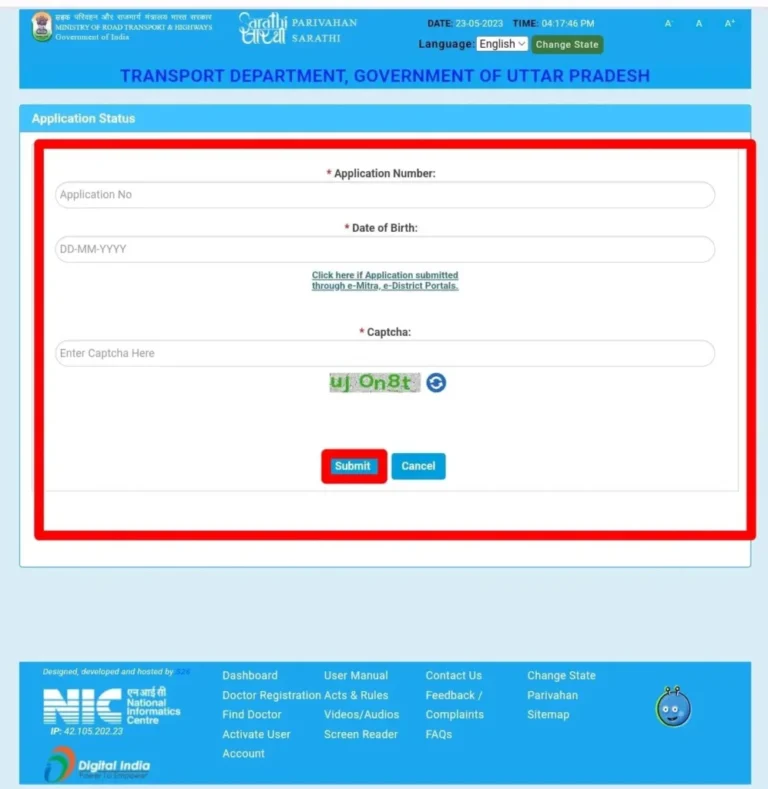
Complete the verification code
Enter the captcha or verification code shown on the screen. This helps prevent automated requests.
Submit and review your details
Click the check or submit button. If the portal finds your record, review the available licence information. You may see details such as your licence number, issuing authority, validity dates, and authorised vehicle categories.
Important: The information displayed depends on the records available in the government database. Some older or state-specific records may not appear online.
How to Check Driving Licence Details Through Sarathi
The Sarathi Parivahan portal provides state-specific driving licence services. The exact menu options may differ between states and Union Territories.
Follow these steps:
- Open the Sarathi website.
- Select your state or Union Territory.
- Look for the driving licence application status section.
- Choose the relevant service, such as licence details or services on an existing licence.
- Enter your licence number and date of birth when requested.
- Follow the instructions to retrieve your record.
Sarathi also supports services such as renewal, duplicate licences, address changes, and adding a vehicle category, depending on the state.
What Details Can You Check Using Your Driving Licence Number?
A Driving Licence Number Check Online can help you confirm important information associated with your licence.
| Information | What it tells you |
|---|---|
| Licence number | The unique number associated with your driving licence |
| Licence holder’s name | The name recorded in the available licence record |
| Issuing authority | The RTO or licensing authority responsible for the licence |
| Date of issue | When the licence or relevant vehicle category was issued |
| Validity dates | The period during which the licence or category remains valid |
| Class of vehicle | The vehicle categories you are authorised to drive |
| Licence status | Available information about the licence record |
The exact information shown can vary depending on the state database and the service you use.
Understanding the Class of Vehicle
Your driving licence may include one or more vehicle categories. These categories determine which vehicles you may legally drive.
Common abbreviations include:
- MCWOG: Motorcycle without gear.
- MCWG: Motorcycle with gear.
- LMV: Light Motor Vehicle.
- Transport vehicle: A category subject to the applicable transport licence requirements.
Always check the category printed on your licence or shown in your official digital record. Do not assume that a licence for one vehicle category automatically authorises you to drive another.
Check Driving Licence Application Status Online
If you recently applied for a learner’s licence, permanent licence, renewal, or duplicate licence, use the application tracking service rather than the existing licence details service.
Steps to Check DL Application Status
- Visit the Sarathi Parivahan portal.
- Select the state where you submitted your application.
- Find the Application Status option.
- Enter your application number and date of birth.
- Complete any verification requested by the portal.
- Submit the details and review your application progress.
This process supports a Driving Licence Application Status Check for services available through your selected state.
Check Learner’s Licence Status
If you applied for a learner’s licence, use the same application tracking process. Your status may show whether the application is pending, whether you need to complete a required step, or whether the learner’s licence has been issued.
If the system cannot find your application, verify the application number and date of birth. You can also use the portal’s application-number recovery service if available.
Check Permanent Driving Licence Status
After passing the driving test, you can check whether your permanent licence application has progressed.
Depending on the state and application, you may see information about approval, printing, or dispatch. If the portal shows approval but you have not received your licence, contact the issuing RTO for dispatch details.
Check Renewal or Duplicate Licence Status
For a renewal or duplicate licence application, use the application number generated when you submitted the request.
Keep your acknowledgement receipt and payment details. These documents can help the RTO identify your application if the online record does not update.
How to Check Driving Licence Validity and Expiry Date
Your licence validity dates tell you when your authorisation to drive begins and when it expires.
To perform a Driving Licence Validity Check:
- Open the official licence details service.
- Enter your licence number and date of birth.
- Retrieve your record.
- Locate the validity dates for the relevant vehicle category.
- Check whether the licence remains valid or requires renewal.
How Long Is a Driving Licence Valid in India?
Validity depends on the licence category, the holder’s age, and the applicable rules.
Parivahan’s published guidance describes different validity periods for non-transport licences based on the holder’s age at issue or renewal. Transport licences follow separate requirements.
Because validity rules and individual licence records can differ, use the expiry date on your official licence record as your reference. If the online date conflicts with your physical licence, contact your licensing authority before driving.
How to Download a Digital Driving Licence
You can retrieve an official digital driving licence through DigiLocker or mParivahan.
Download Driving Licence Through DigiLocker
- Visit DigiLocker or open its official app.
- Sign in or create an account.
- Find the driving licence document category.
- Select the relevant issuing authority.
- Enter the requested licence details.
- Retrieve the document and save it in your account.
If the document does not appear, check that you entered the correct details. Older records may need to be migrated or updated by the issuing RTO.
How to Check Driving Licence Without a DL Number
If you have lost your licence number, you may still be able to recover it.
Try these options:
- Check an old driving licence photocopy or scan.
- Review your application acknowledgement or renewal receipt.
- Look for your licence in DigiLocker or mParivahan.
- Check previous official messages or emails related to your application.
- Contact the issuing RTO if you cannot recover the number.
The official licence details service generally requires the licence number and date of birth. It does not guarantee a public search by name or mobile number.
For application tracking, use your application number instead of the licence number.
How to Check an Old Driving Licence Online
Older licences may use a different number format or may not appear in the central database.
If the portal rejects your number:
- Check the number printed on your licence carefully.
- Review the official portal’s instructions for older licence formats.
- Enter the number in the required format without adding unrequested characters.
- Try the relevant state service if the central record does not appear.
- Contact the issuing RTO if the licence remains unavailable.
Some older records may require digitisation or migration into the current system. The RTO can advise you on the process and supporting documents.
Common Driving Licence Check Problems and Solutions
| Problem | What you should do |
|---|---|
| Licence details not found | Check the number and date of birth; contact the RTO if the record remains missing |
| Invalid licence number | Review the required number format and correct any typing errors |
| Incorrect date of birth | Confirm the date on your original application or licence |
| Application status not updated | Refresh the status and check whether documents or appointments remain pending |
| Licence approved but not received | Ask the RTO for the dispatch tracking number |
| Licence missing from DigiLocker | Contact the RTO to check whether the record needs migration |
| Payment status unclear | Use the Sarathi fee-payment verification service |
| Incorrect personal details | Contact the licensing authority and ask about the correction process |
What If Your Application Is Still Pending?
A pending status does not always mean your application has failed.
Check whether you need to upload documents, attend an appointment, complete a test, or resolve a payment issue. Sarathi provides application-specific services, but the exact steps depend on the state.
If you have completed every requirement and the status remains unchanged, contact the RTO or official helpdesk with your application number and acknowledgement receipt.
How to Search for a Driving Licence by Name and Address
In India, you generally cannot search for a driving licence download using only a person’s name and address through the official Parivahan portal. However, you can recover your own licence details through these methods:
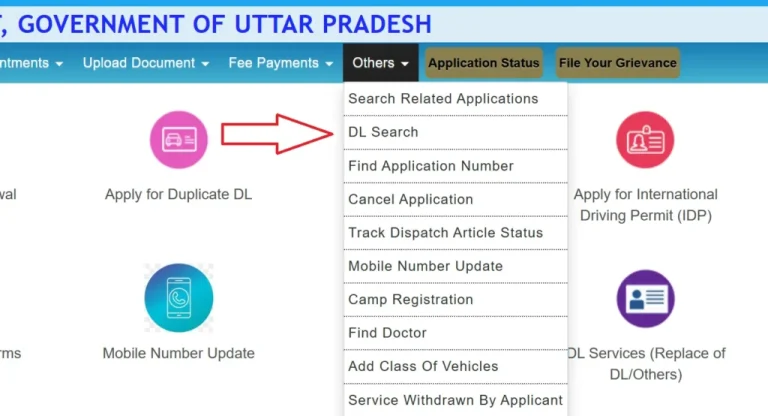
- DigiLocker: Sign in and check your issued documents for your digital driving licence.
- mParivahan: Open the app and check your saved licence information.
- RTO assistance: Contact the issuing RTO with your name, date of birth, address, and identity proof to recover your licence number or request a duplicate.
For privacy and security, use official government services rather than third-party websites claiming to provide licence details through name-only searches.
Other Driving Licence Services Available Online
Once you retrieve your licence details, you may also need another transport service.
| Service | What it helps you do |
|---|---|
| Driving Licence Renewal Online | Renew an expired or expiring licence |
| Duplicate driving licence | Request a replacement for a lost or damaged licence |
| Change of address | Update your licence address |
| Add vehicle category | Apply to add another authorised vehicle class |
| Name or date of birth correction | Request correction of personal details |
| Mobile number update | Update contact information where supported |
| International Driving Permit | Apply for an international permit when eligible |
Visit Sarathi, select your state, and check the available services before applying. Some services require document uploads, fees, appointments, or an RTO visit.
Frequently Asked Questions
How can I check my driving licence online in India?
Visit the official Parivahan licence details service, enter your licence number and date of birth, complete the verification code, and submit the form.
Can I check my DL status using my application number?
Yes. Open Sarathi, select your state, and use the Application Status service. Enter your application number and date of birth.
Can I check my driving licence using my mobile number?
The standard licence details service requires your licence number and date of birth. Some state services may offer additional recovery options, but a mobile-number-only search is not guaranteed.
Is online driving licence verification free?
The basic licence details lookup is generally free. However, application services such as renewal, duplicate licences, or other changes may require government fees.
How long does a new driving licence take to appear online?
The timing depends on application processing, approval, and database updates. Check your application status through Sarathi and contact the RTO if the record does not appear after approval.
Is a digital driving licence valid in India?
An authentic electronic licence available through DigiLocker or mParivahan is recognised under applicable government rules. Use the official document rather than an ordinary screenshot.
What should I do if my driving licence details are incorrect?
Contact the issuing RTO and ask about the correction procedure. Keep your original licence and supporting identity or date-of-birth documents ready.
Can I check my driving licence using my vehicle number?
A vehicle registration number is used for vehicle-related services, not the standard driving licence details lookup. Use your DL number and date of birth to retrieve your licence record.