
eChallan Status Check – Check & Pay Traffic Challan
Have you received a traffic challan and want to know whether you need to pay a fine? Indian vehicle owners can now check their traffic violations online through the official Parivahan eChallan portal. The government provides digital services that allow drivers to check pending fines, view offence details, verify payments, and download challan receipts without visiting an RTO office.
You can search for a traffic challan using your vehicle registration number, challan number, or driving licence number. The portal also helps you review payment details and find available options for resolving outstanding fines.
Whether you own a car, motorcycle, scooter, or commercial vehicle, this guide explains how to check your traffic challan online, pay eligible fines, download receipts, and resolve common payment problems. You will also learn how to use NextGen eChallan services and Virtual Courts.
What Is an eChallan?
An eChallan is an electronic traffic violation notice that authorized traffic police and transport authorities issue when a driver breaks applicable traffic rules.
Unlike traditional paper challans, an Electronic Traffic Challan uses a digital system to record violations and manage payments. Traffic authorities can generate challans through surveillance cameras, automated number plate recognition systems, and handheld devices used by traffic officers.
For example, a traffic camera may record a vehicle crossing a red light. The system can capture the vehicle registration number and forward the information for verification and challan generation.
A typical challan may contain:
- Challan identification number.
- Vehicle registration number.
- Date and time of the violation.
- Location of the offence.
- Description of the traffic violation.
- Applicable fine amount.
- Name of the issuing department.
- Payment status and transaction details.
The Digital Traffic Challan System makes it easier for authorities to maintain records and helps vehicle owners detail access available information online.
How to Check eChallan Status Online in India?
You can check your vehicle’s traffic challan through the official Parivahan website. The portal provides different search methods, so you can use whichever information you have available.
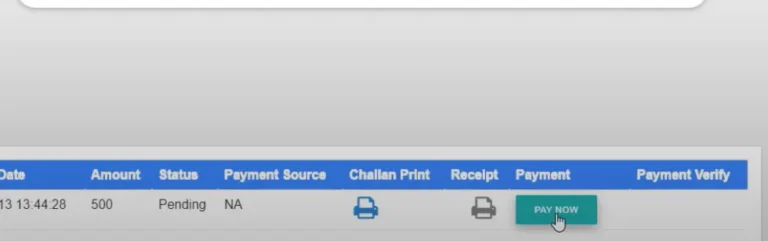
Follow these steps:
- Visit the official Parivahan eChallan portal.
- Open the challan status or payment section.
- Choose your preferred search method.
- Enter your vehicle number, challan number, or driving licence number.
- Provide additional information if the portal requests it.
- Complete the captcha verification.
- Click the Get Details button.
- Review the available challan records.
If the system finds a matching record, it will display the available violation and payment information.
Check the vehicle registration number, offence description, date, and fine amount before taking further action. If the portal displays photographic evidence, review it carefully.
How to Check eChallan by Vehicle Number?
A Vehicle Number Challan Check is one of the easiest ways to find available traffic violation records. You can use this method when you do not have the challan reference number.
Follow these instructions:
- Open the official eChallan website.
- Select the challan status service.
- Choose the Vehicle Number option.
- Enter your complete vehicle registration number.
- Provide additional verification information if requested, such as the required chassis or engine number details.
- Enter the captcha code.
- Click Get Details.
- Review the matching challan records.
For example, if your registration number is DL1AB1234, enter it exactly as it appears on your Registration Certificate (RC).
The portal may display multiple violations linked to your vehicle. Review each record separately because different challans may have different dates, locations, and payment amounts. This method works for eligible cars, motorcycles, scooters, and other registered vehicles.
How to Check eChallan by Challan Number?
If you received a traffic notice through SMS or another official communication, you can use its challan number to find the related record.
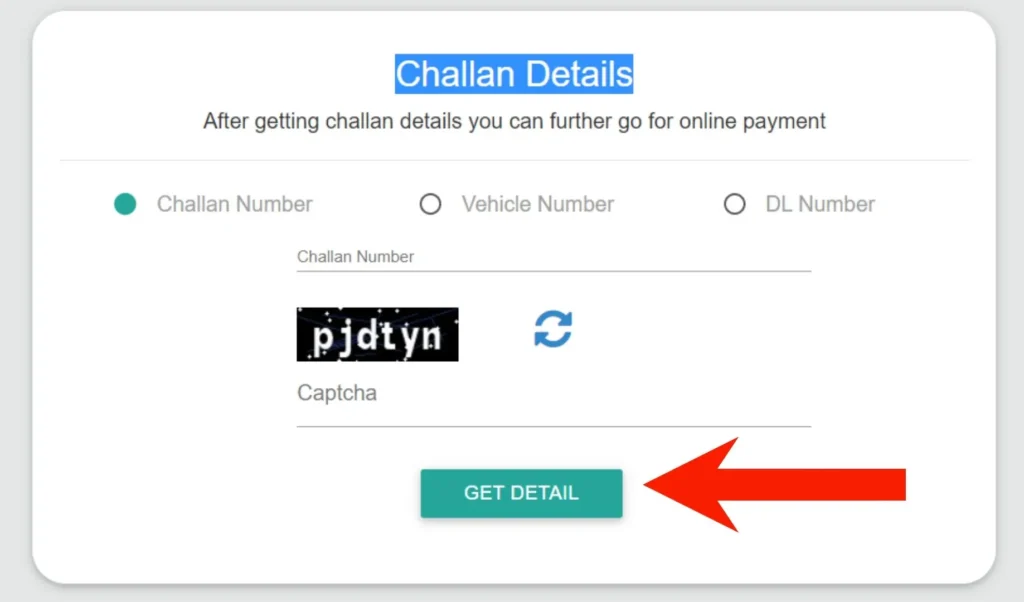
Follow these steps:
- Visit the official eChallan website.
- Select the Challan Number search option.
- Enter the complete challan reference number.
- Complete the captcha verification.
- Click Get Details.
- Review the available information.
The portal may display the vehicle number, offence details, issuing authority, fine amount, and payment status. You can usually find the reference number in your traffic notice, official SMS, or previously downloaded challan document. This method is particularly useful when you want to verify one specific Traffic Challan Online instead of searching through every record linked to your vehicle.
How to Check eChallan by Driving Licence Number?
You can also use your driving licence to search for available traffic violations.
Follow these steps:
- Open the official government eChallan portal.
- Select the DL Number search option.
- Enter your complete driving licence number.
- Provide your date of birth if requested.
- Complete the captcha.
- Click Get Details.
- Review the available challan information.
Make sure you enter the correct licence number and other requested details. Incorrect information may prevent the portal from finding your records. This method can help drivers who do not have their vehicle registration number or challan reference available.
What Details Can You See After Checking a Challan?
After a successful search, the government portal may display important information about the recorded violation.
| Information | Description |
|---|---|
| Challan Number | Unique identification number |
| Vehicle Number | Registration number linked to the challan |
| Challan Date | Date of the recorded violation |
| Offence Details | Traffic rule associated with the violation |
| Fine Amount | Amount payable for the offence |
| State | Relevant state or jurisdiction |
| Department | Issuing traffic police or transport authority |
| Location | Available details about the violation location |
| Payment Status | Current payment information |
| Evidence | Available photographs or video evidence |
The information may vary according to the issuing department and the services available through the portal. Always review these details before paying. If the registration number, offence, or vehicle information does not match your records, investigate the issue before making a payment.
What Does Your eChallan Status Mean?
Understanding your challan status helps you decide what to do next. The government portal may display different labels depending on the service and case.
Here are some common results:
| Status | Meaning | Recommended action |
|---|---|---|
| Pending | Payment remains due | Verify and pay the genuine fine |
| Paid | Payment has been recorded | Save your receipt |
| Disposed | The matter has been closed or resolved | Review the final record |
| Court | The matter has moved to a court process | Check Virtual Courts |
| Failed | Payment did not complete successfully | Verify the transaction |
| Pending Transaction | Payment confirmation remains unresolved | Check payment status |
| Challan Not Found | No matching record appeared | Verify details and portal |
These explanations describe common outcomes, not a universal list of identical status labels across every government system. A pending result does not always mean you should pay immediately. If your bank account already shows a successful transaction, verify the payment first.
How to Pay eChallan Online Through Parivahan?
You can pay an eligible traffic fine through the official government portal without visiting a traffic police office. Before paying, verify that the challan belongs to your vehicle and that the offence details are correct.
Follow these steps:
- Visit the official eChallan portal.
- Open the challan status or payment service.
- Search using your vehicle number, challan number, or DL number.
- Enter the requested verification details.
- Click Get Details.
- Review the available challan records.
- Select the challan you want to pay.
- Click Pay Now or the available payment option.
- Choose a payment method.
- Complete the transaction.
- Save your payment acknowledgement or receipt.
Depending on the portal and payment gateway, you may see these options:
- UPI.
- Debit card.
- Credit card.
- Net banking.
- Other available digital payment methods.
Check the payable amount before confirming the transaction. Wait for the final confirmation instead of closing the payment page immediately. After completing the payment, return to the portal and verify that the challan status has updated.
How to Pay eChallan Offline?
If you cannot complete an online payment, an authorized offline payment facility may be available in your area. Depending on local arrangements, you may be able to pay through a traffic police office, RTO, or another designated payment centre.
Follow these steps:
- Visit the relevant traffic police office or authorized payment centre.
- Provide your challan number, vehicle number, or driving licence details.
- Ask the officer to verify the challan.
- Confirm the outstanding amount.
- Pay using the accepted payment method.
- Collect the official payment receipt.
Offline payment facilities and accepted methods vary by location. Contact the relevant authority before visiting. Always collect a receipt after payment. Keep it until the government portal reflects the updated transaction.
How to Check eChallan Payment Status Online?
Sometimes your bank confirms a payment, but the government portal still shows a pending challan. This can happen when the payment gateway and government system take additional time to update their records.
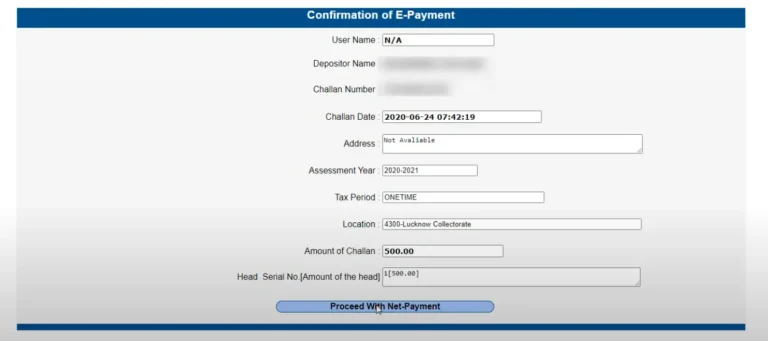
Use the official verification service to check your transaction.
- Open the official eChallan website.
- Select Pending Transaction or Payment Verification.
- Enter your challan number or vehicle registration number.
- Complete the captcha.
- Click Get Details.
- Review the transaction information.
- Use the Verify option if the service provides it.
Keep your transaction ID, bank reference number, and payment acknowledgement ready. If the system confirms successful payment, save the details and avoid paying again. If it shows a failed transaction, follow the instructions provided by the payment service.
How to Download an eChallan Payment Receipt?
A payment receipt provides proof that you completed a traffic fine payment. You can retrieve an available receipt through the official government service.
Follow these steps:
- Visit the eChallan portal.
- Open the Download Payment Receipt service.
- Select an available search method.
- Enter the required challan or vehicle details.
- Complete the captcha.
- Click Get Details.
- Find the successfully paid challan.
- Select the receipt option.
- Download and save the document.
If your receipt does not appear, verify the transaction status first. The receipt service may not display a payment until the system confirms it. Keep a digital copy on your phone or computer for future reference.
Remember: A challan print and payment receipt serve different purposes. A challan print shows the violation notice, while a payment receipt confirms that the transaction succeeded.
How to Check Challan Through the mParivahan App?
The mParivahan app provides several digital transport services. Depending on its current version and available state services, you may also access vehicle and challan-related information.
Follow these steps:
- Open the Google Play Store or Apple App Store.
- Search for the official mParivahan application.
- Verify the publisher before installing it.
- Open the application.
- Follow the registration or sign-in instructions.
- Add or search for your vehicle.
- Open the available vehicle or challan information service.
- Review the displayed details.
The app’s available features may change over time. If you cannot find a challan through the app, use the official eChallan website to verify the record. Never install an application from an unexpected SMS or WhatsApp link.
Old Parivahan vs NextGen eChallan Portal: What’s the Difference?
The government provides different eChallan workflows. This can confuse users who expect every challan to appear through the same page. The older eChallan portal and NextGen eChallan portal both support the government’s digital traffic enforcement services. However, the portal you need may depend on your state, the requested service, and current government instructions.
The older portal displays notices directing users from certain states and Union Territories to NextGen for relevant services.
To choose the correct portal:
- Start from the official government eChallan website.
- Read the state-specific notice.
- Follow the official NextGen link when directed.
- Select the appropriate checking, payment, receipt, or grievance service.
- Avoid unofficial websites that imitate government portals.
You should not assume that a missing record means you have no pending fine. Check the applicable official portal and state traffic police service.
State-Wise eChallan Status Check in India
Indian traffic authorities operate across different states and Union Territories. Although the national eChallan system offers common services, some departments also maintain their own citizen-facing websites.
You can begin with these official government resources:
| State | Relevant authority |
|---|---|
| Delhi | Delhi Traffic Police |
| Maharashtra | Maharashtra Traffic Police |
| Telangana | Telangana Traffic Police |
| Karnataka | Karnataka State Police |
| Uttar Pradesh | Uttar Pradesh Traffic Police |
| Rajasthan | Rajasthan Traffic Police |
| Haryana | Haryana Traffic Police |
| Punjab | Punjab Police |
| Gujarat | Gujarat Police |
| West Bengal | West Bengal Traffic Police |
Start with the national portal and follow its current instructions for your state.
If a separate state website handles your challan, use the link published by the relevant government department. Do not assume that every state follows an identical payment or grievance procedure.
How to Check eChallan on Virtual Courts?
Some traffic violations move to the court system. In these cases, the Virtual Courts website may provide the next step.
The official Virtual Courts portal allows users to search eligible cases through details such as a mobile number, CNR number, party name, or challan/vehicle number.
Follow these steps:
- Visit the Virtual Courts website.
- Select the relevant state.
- Choose a search method.
- Enter your challan or vehicle details.
- Complete the required verification.
- Find your case.
- Open the case details.
- Review the available options.
- Choose payment or the option to contest, where available.
- Follow the additional instructions.
If you pay online, save the acknowledgement. If you decide to contest the case, the system may provide court information and hearing instructions. A court-referred challan follows a different process from an ordinary pending payment. Read the instructions carefully before taking action.
What to Do If Your eChallan Is Not Showing?
Sometimes the portal cannot find a challan even when you believe a traffic violation occurred. Incorrect details, portal differences, or delayed updates may explain the problem.
Try these solutions:
1. Check your vehicle registration number
Enter the complete registration number. Review the state code, letters, and numbers before searching again.
2. Verify your challan number
Compare the number with your original traffic notice or official SMS.
3. Try another search method
If your vehicle number does not produce a result, try your challan number or driving licence details.
4. Check the applicable portal
Some states use NextGen or a separate traffic police website. Follow the official notice displayed on the national portal.
5. Check Virtual Courts
If the authority has referred your case to court, search the official Virtual Courts website.
6. Contact the issuing department
If the record remains unavailable, contact the relevant traffic police department or official helpdesk. Avoid third-party websites that promise to reveal hidden or unavailable traffic records.
What to Do If eChallan Payment Fails?
A failed payment can create confusion, especially when your bank account shows a debit but the government portal still displays a pending challan.
Follow these steps to resolve the issue.
Money Deducted but Challan Still Pending
First, check your bank or payment application to confirm whether the transaction succeeded.
Then:
- Save the transaction ID.
- Note the bank reference number or GRN, if available.
- Open the official pending-transaction service.
- Search using your challan or vehicle number.
- Verify the transaction result.
- Save the confirmation.
- Contact the official helpdesk if the problem continues.
Do not immediately repeat the payment. You should confirm the first transaction before attempting another payment.
Payment Gateway Shows an Error
Check your internet connection and bank transaction history. If your bank did not debit the amount and the government portal confirms failure, follow the payment service instructions before trying again.
Receipt Is Not Available
The receipt may not appear until the system confirms the payment. Verify the transaction status and try the official receipt service again. Keep your bank messages and transaction references until the issue is resolved.
How to Raise a Complaint Against a Wrong eChallan?
You should challenge a traffic challan when the record contains incorrect information or does not relate to your vehicle.
Common reasons include:
- Incorrect vehicle registration number.
- Wrong vehicle identification.
- Duplicate challan.
- Incorrect offence details.
- Mismatched photographic evidence.
- Vehicle sold before the recorded violation.
- Stolen vehicle.
- Suspected cloned number plate.
Follow this process:
- Open the official eChallan grievance service.
- Search for the relevant challan.
- Select the complaint or grievance option.
- Choose the issue that matches your situation.
- Explain the problem clearly.
- Attach supporting evidence where requested.
- Submit the complaint.
- Save your grievance reference number.
- Track the complaint through the official service.
Useful supporting documents may include your RC, vehicle sale documents, police complaint, photographs, dashcam footage, GPS records, or other relevant evidence. Always provide accurate information. Submitting a complaint does not automatically cancel a challan. The issuing authority must review the matter.
What Happens If You Do Not Pay an eChallan?
Ignoring a genuine traffic challan can create further problems. Depending on the offence and applicable rules, the issuing authority may take additional action or refer the matter to court.
Possible consequences include:
- Further legal proceedings.
- Court-related notices.
- Additional action under applicable traffic laws.
- Complications involving certain vehicle-related services, where legally applicable.
Check the payment deadline mentioned in your notice. Some challans may carry a 60-day payment period, but the applicable deadline and consequences depend on the specific notice and relevant rules.
If you receive a court notice, follow its instructions instead of treating it like an ordinary online payment reminder. The safest approach is to verify the violation and resolve a genuine challan through the official process.
Common Traffic Violations and Challan Fines in India
Traffic authorities issue challans when drivers break applicable road safety rules. The Motor Vehicles Act, 1988, as amended, provides the legal framework for many traffic penalties. State rules and notifications may also affect the amount.
Common violations include:
| Traffic violation | Commonly cited penalty |
|---|---|
| Driving without a valid licence | ₹5,000 |
| Driving without valid insurance | ₹2,000 for a first offence; ₹4,000 for a subsequent offence |
| Riding without a helmet | ₹1,000 |
| Not wearing a seat belt | ₹1,000 |
| Using a mobile phone while driving | Depends on the applicable offence |
| Overspeeding | Varies by vehicle category and applicable rules |
| Drunk driving | ₹10,000 for a first offence; ₹15,000 for a subsequent offence |
| Juvenile driving | ₹25,000 and additional legal consequences |
| Not giving way to emergency vehicles | ₹10,000 |
These amounts are general examples, not a final assessment of your liability. The actual fine may depend on the offence, vehicle category, previous violations, and applicable state rules.
Some violations may also lead to licence suspension, vehicle impoundment, or court proceedings. Always check the amount shown on your official challan and confirm the applicable penalty with the issuing authority.
How to Identify Fake eChallan SMS and Websites?
Fraudsters sometimes send fake traffic fine messages to steal banking information or install harmful applications. Some messages claim that you have an unpaid traffic fine and ask you to download an APK file or visit a suspicious payment website.
Protect yourself with these precautions:
- Open the official government website directly.
- Check the domain before entering personal details.
- Never share your OTP, UPI PIN, or banking password.
- Avoid APK files received through SMS or WhatsApp.
- Download applications through trusted official app stores.
- Verify the challan before making payment.
- Avoid suspicious payment links.
CERT-In issued a security advisory in March 2026 about malware campaigns that impersonate RTO and eChallan notifications. Some fraudulent messages encourage users to install applications that can compromise their phones and financial information.
If you have installed a suspicious application, remove it, run a trusted security scan, and check your financial accounts. Contact your bank immediately if you notice an unauthorized transaction.
The official eChallan portal also warns users about fraudulent websites and applications. Never share passwords, OTPs, or sensitive payment information through suspicious messages or calls.
Tips to Avoid Traffic Challans
Following traffic rules helps protect you, your passengers, and other road users. You can also avoid unnecessary fines by maintaining your vehicle and documents.
Here are some practical tips:
- Follow speed limits: Observe posted speed limits on roads, highways, and residential streets.
- Respect traffic signals: Stop at red lights and follow road signs.
- Wear safety equipment: Use a helmet on two-wheelers and a seat belt in cars.
- Avoid mobile phone use: Keep your attention on the road while driving.
- Park legally: Use designated parking spaces and follow local restrictions.
- Keep documents valid: Renew your driving licence, registration, insurance, and pollution certificate when required.
- Follow lane rules: Avoid wrong-side driving and unsafe manoeuvres.
- Check your vehicle: Maintain working lights, indicators, brakes, and other safety equipment.
These simple habits can help you drive safely and reduce the risk of traffic violations.
Frequently Asked Questions
1. How can I check my traffic challan online?
Visit the official Parivahan eChallan portal. Select a search method, enter your vehicle number, challan number, or driving licence number, complete the verification, and view the available records.
2. Can I check an eChallan using my vehicle number?
Yes. Select the vehicle number option and enter your registration number. The portal may request additional verification information.
3. Can I check an eChallan without a challan number?
Yes. You can search using your vehicle registration number or driving licence number when the selected portal supports those options.
4. Is checking an eChallan online free?
Yes. Checking available challan information through the official government portal does not require a service fee. You only need to pay a genuine outstanding fine.
5. How long do I have to pay an eChallan?
Check the deadline mentioned on your challan. Some notices may carry a 60-day payment period, but the applicable deadline depends on the specific notice and relevant rules.