
Sarathi Parivahan – Driving Licence Status, Licence Apply
Sarathi Parivahan Sewa is an official online portal developed by the Government of India to provide digital driving licence and learner’s licence services. It allows citizens to apply for a Driving Licence (DL) or Learner’s Licence (LL), renew an existing licence, book driving test appointments, access licence-related documents, and check application status online. As part of the Parivahan Sewa system, Sarathi makes licence-related services more accessible, reduces paperwork, and saves time by allowing users to complete many formalities from home.
The Sarathi Parivahan Sewa portal focuses on driving licence services, while other sections of the Parivahan Portal cover vehicle registration, Registration Certificate (RC) services, permits, and other transport-related tasks. This separation helps users find the right service and complete their RTO-related work with less confusion. Through the official Parivahan platform, citizens can access various RTO services online, making the process more convenient, transparent, and efficient.
Applicants can also use the portal to track their application progress and check the availability of services offered by their respective Regional Transport Office (RTO). For accurate information, users should visit the official Sarathi Parivahan website and follow the instructions for their state. This guide explains the main services, required documents, application process, fees, and solutions to common problems.
What Is Sarathi Parivahan Sewa?
Sarathi Parivahan Sewa is an online licensing platform that helps people access driving licence services in India. It supports several tasks that applicants previously handled through transport offices, although some steps still require an in-person visit.
The Ministry of Road Transport and Highways oversees India’s national transport-service framework, while state transport departments and licensing authorities handle applicable procedures.
The portal helps users access services such as:
- Applying for a learner’s licence.
- Applying for a permanent driving licence.
- Checking an application’s status.
- Booking a driving test appointment where available.
- Paying application fees.
- Uploading required documents.
- Applying for licence renewal or a duplicate licence.
- Accessing other state-supported licensing services.
Licence-Related Services
The Sarathi Parivahan Sewa portal offers a wide range of online driving licence services for Indian citizens. You can apply for a new Driving Licence (DL) or Learner’s Licence (LL), renew an existing licence, book driving test appointments, and request a duplicate licence. The portal also allows applicants to check their application status, take the learner’s licence test, and access other licence-related services conveniently.
Users can complete many application steps online without visiting an RTO for every task. They can also check the required documents, review application details, and follow the instructions for their state. These digital services help reduce paperwork, save time, and make driving licence procedures easier to manage.
Vehicle-Related Services
The Parivahan Sewa portal provides various online services for vehicle owners across India. You can access services related to new vehicle registration, Registration Certificate (RC), ownership transfer, address changes, and vehicle registration renewals. The portal also allows users to manage hypothecation details, book appointments, track application status, and complete other vehicle-related procedures.
Vehicle owners can check the requirements for different services and follow the instructions provided by their respective Regional Transport Office (RTO). These online facilities help reduce paperwork and minimize unnecessary visits to transport offices. By making vehicle registration services more accessible, the portal offers a convenient way to manage important vehicle documents and registration records.
Sarathi Parivahan Official Website and Login
The safest way to access licensing services is through the official government website:
Official website: https://sarathi.parivahan.gov.in/
Avoid entering personal information on unfamiliar websites that imitate government portals.
How to Access the Portal
Follow these steps:
- Open the official website in your browser.
- Select your state from the available list.
- Review the services displayed for that state.
- Choose the task you want to complete.
- Enter the requested application details.
- Follow the instructions shown on the screen.
You may not need a separate login for every service. Some tasks require an application number, date of birth, OTP, or other verification details.
How to Select Your State
State selection matters because each transport department may enable different services or follow specific procedures. If you select the wrong state, the service you need may not appear.
Choose the state relevant to your application and follow its instructions. If your state does not appear, consult the relevant transport department rather than using an unofficial alternative.
Services Available on the Portal
The available options depend on your state, application type, and eligibility.
Learner’s Licence Application
A Learner’s Licence (LL) is the first step toward obtaining a permanent driving licence. Eligible applicants can apply online, complete the required formalities, and take the learner’s licence test. Generally, applicants must be 16 years old for gearless motorcycles (with guardian consent where applicable) and 18 years old for other categories of vehicles. A learner’s licence is usually valid for six months.
Permanent Driving Licence
After holding a valid learner’s licence for the required period and successfully passing the driving test, applicants can apply for a Permanent Driving Licence. The entire application process, including appointment booking and status tracking, can be managed online through the Sarathi portal.
Driving Licence Renewal
If your driving licence is about to expire, you can apply for DL renewal online without unnecessary paperwork. Existing licence holders can check whether the portal supports their renewal application and review the documents and fees required for their circumstances.
Duplicate Driving Licence
If your driving licence has been lost, stolen, damaged, or becomes unreadable, you can request a duplicate licence through Sarathi Parivahan Sewa. You may qualify to apply for a duplicate. The licensing authority determines the applicable requirements.
Change of Address in Driving Licence
If you have changed your residential address, you can update it on your driving licence by submitting the required documents online. This helps keep your licence information accurate and up to date.
Other Services
Depending on state availability, the portal may also support address changes, personal-detail corrections, additional vehicle classes, International Driving Permits, document uploads, payment verification, and appointment booking.
Always check the official portal for the current options available to you.
Vehicle Registration Certificate (RC) Services
The Parivahan Sewa portal offers various online services to help vehicle owners manage registration records and complete essential transport-related tasks. Key vehicle-related services include:
- New Vehicle Registration: Register a newly purchased vehicle through the relevant RTO.
- Registration Certificate (RC) Services: Check RC details and access available registration-related services.
- Ownership Transfer: Apply to transfer vehicle ownership when buying or selling a vehicle.
- Address Change: Update the address on your vehicle registration records.
- Duplicate RC: Apply for a replacement Registration Certificate if the original is lost or damaged.
- Hypothecation Services: Add or terminate hypothecation details related to vehicle loans.
- Application Status Tracking: Check the progress of your vehicle-related applications.
- Appointment Booking: Schedule appointments for services that require an RTO visit.
- Vehicle Registration Renewal: Apply for renewal when required and eligible.
- Vehicle Fitness Certificate: Access fitness certificate services for eligible vehicles.
- Permit Services: Find and access relevant permit services for commercial vehicles.
- Vehicle Details Verification: Check available vehicle registration information online.
Note: Service availability and application procedures may vary by state and vehicle type. Visit the official Parivahan Sewa portal for accurate information and online services.
E-Challan Services
The E-Challan services available through the Parivahan Sewa system allow vehicle owners and drivers in India to check traffic fines and manage challan-related information online. Users can check their traffic challan status using their vehicle registration number, challan number, or driving licence number, depending on the available options.
Key E-Challan Services
- E-Challan Status Check: Check the status of a traffic challan online.
- Traffic Fine Check: Find pending traffic fines associated with your vehicle or driving licence.
- Vehicle Number Challan Check: Search for challan details using your vehicle registration number.
- Challan Number Search: Retrieve available traffic violation details using the challan number.
- Driving Licence Challan Check: Check challan information using your driving licence number, where supported.
- Online Challan Payment: Pay eligible traffic fines through the official online payment system.
- Payment Status Check: Verify whether your challan payment has been processed successfully.
- Payment Receipt: Save the transaction details or receipt for future reference.
- Challan History: Review available challan records and their current status.
Information and Verification Services
Sarathi Parivahan Sewa and the broader Parivahan portal provide various online information and verification services to help citizens access driving licence details, vehicle registration records, and transport-related information. These services allow users to verify available records, check application progress, and find official rules and forms without making unnecessary visits to a Regional Transport Office (RTO).
Know Your Driving Licence Details
Verify your driving licence details using your DL number and date of birth, where required. Check available licence records and confirm important information online.
Know Your Vehicle Details
Check vehicle registration details using your vehicle number through the official Parivahan portal. Available records may include vehicle class, registration status, and other relevant information.
Motor Vehicle Rules and Forms
Access official Motor Vehicles Act provisions, rules, notifications, and transport-related application forms. These resources help users understand legal requirements and prepare the necessary documents.
Driving Licence Application Status
Track your driving licence application to check its current processing status. This service helps applicants follow updates related to new licences, renewals, and other licence services.
Registration Certificate (RC) Verification
Check available Registration Certificate details and track RC-related applications online. Users can also explore services for duplicate RCs, ownership transfers, and registration updates.
E-Challan Information
Check traffic challan details and pending fines through the official e-Challan portal. Users can search using supported details, such as their vehicle number or challan number.
RTO Information and Services
Find relevant Regional Transport Office information and explore available transport services. This helps users understand application procedures and identify services that may require an office visit.
Permit and Vehicle Fitness Information
Access permit-related and vehicle fitness services for eligible vehicles through the Parivahan system. Availability and requirements depend on the vehicle category and applicable state regulations.
Official Notifications and Documents
Find government notifications, transport guidelines, and other official documents related to vehicle and licence services. Reviewing these resources helps users understand current procedures and documentation requirements.
How to Change Your Address or Correct Details
Select the relevant service if it appears on your state portal. Provide accurate information and the supporting documents requested.
If you have already submitted an application with incorrect details, do not assume you can edit every field online. The official FAQ advises applicants in some situations to contact the zonal office or transport department with their original documents.
Driving Licence (DL) Online Application Process
Sarathi Parivahan Sewa allows applicants to apply for a Driving Licence download (DL) or Learner’s Licence (LL) online through the official government portal. You can complete most application steps from home, including filling out the form, submitting documents, paying fees, and booking appointments, which helps reduce unnecessary visits to the Regional Transport Office (RTO).
Follow these steps to complete your driving licence application online.
Visit the Official Website
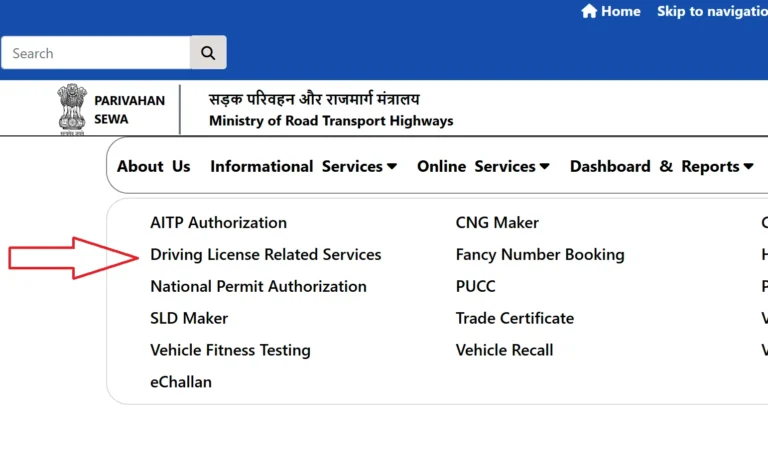
Open the official Parivahan Sewa portal and select Online Services > Driving Licence Related Services. This will take you to the section for licence-related applications.
Select Your State
Choose your state or Union Territory from the available list to access the relevant Sarathi portal. The services and application requirements may vary depending on your state.
Choose the Required Service
Select the appropriate option based on your needs:
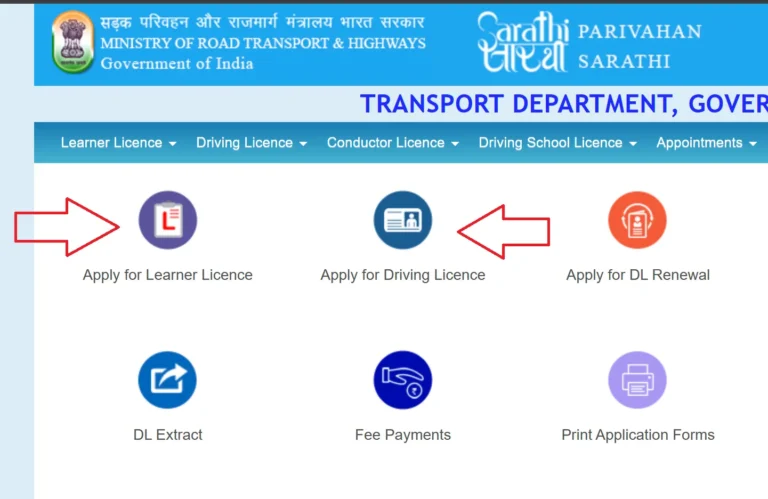
- Apply for Learner’s Licence: Choose this option if you are applying for your first learner’s licence.
- Apply for Driving Licence: Select this option if you already hold a valid Learner’s Licence and meet the eligibility requirements.
Note: You generally need a valid Learner’s Licence before applying for a permanent Driving Licence, subject to the applicable rules and eligibility conditions.
Fill Out the Application Form
Enter your personal information accurately in the online application form. Common details include:
- Full name
- Date of birth
- Residential address
- Mobile number
- Email address, if required
Review all information carefully before submitting the form to avoid errors or processing delays.
Upload the Required Documents
Upload the necessary documents according to your state’s requirements and the instructions displayed on the portal. Commonly accepted documents may include:
- Aadhaar Card or another accepted identity proof
- Address proof, such as a passport or voter ID
- Proof of date of birth, if required
- Passport-size photograph, if required
- Signature, if required
- Medical certificate for applicants who need one
Check the official document requirements before uploading files, as not every applicant needs to submit the same documents.
Pay the Application Fee
Pay the applicable driving licence or learner’s licence fee using the payment methods available on the portal. Save the payment receipt or transaction reference for future use.
Book Your Test Appointment
If required, book an available appointment at your designated RTO through the Sarathi portal. Learner’s Licence applicants may need to complete a learner’s test, while permanent Driving Licence applicants must generally pass a practical driving test.
Track Your Application Status
Visit the Sarathi portal and select the application status option to check your progress using your application number and other requested details. Regularly checking your status helps you identify pending steps and stay informed about your application.
Once you complete all required steps and meet the eligibility conditions, the licensing authority will process your application according to the applicable rules. You can find official instructions and available services on the Parivahan Sewa website.
How to Book a Slot on Sarathi Parivahan Sewa
The Sarathi Parivahan Sewa portal allows applicants to book driving test appointments online without making an initial visit to the Regional Transport Office (RTO). You can select an available date and time, check appointment availability, and schedule your driving test according to your application requirements.
How Driving Test Slot Booking Works
- RTO Availability: The portal displays appointment slots based on the availability of the selected RTO.
- Available Dates: Test dates and timings vary depending on the location and daily testing capacity.
- Weekday Appointments: Availability depends on the RTO’s working schedule and appointment demand.
- Peak Periods: Slots may fill up quickly during busy periods, public holidays, or after appointment backlogs.
- Online Appointment Confirmation: After selecting an available slot, follow the portal instructions to confirm your booking.
Why Are Driving Test Slots Sometimes Unavailable?
If the portal displays a “No Slot Available” message, several factors may explain the issue:
- A high number of driving licence applicants
- Limited daily driving test appointments
- Public holidays or RTO closures
- Temporary changes to the RTO testing schedule
- Technical problems or portal maintenance
- No appointments currently released for the selected period
Tip: Check the official Sarathi portal regularly for newly available appointments. If no slot appears, try another eligible date or check again later, following your RTO’s instructions.
Documents Required for a Driving Licence
Before applying for a Learner’s Licence (LL) or Driving Licence (DL) through Sarathi Parivahan Sewa, prepare the documents required for your application. The exact requirements depend on the licence type, your eligibility, and the applicable state rules.
Address Proof
- Aadhaar Card, where accepted
- Voter ID Card
- Passport
- Electricity bill, where accepted
- Ration Card, where accepted
- Residence certificate issued by the relevant authority, where accepted
Age Proof
- Birth Certificate
- Class 10 certificate or mark sheet showing the date of birth
- Passport
- PAN Card, where accepted as proof of date of birth
- Other government-approved age proof
Identity Proof
- Aadhaar Card
- PAN Card
- Passport
- Voter ID Card
- Another government-approved identity document
Additional Documents, If Required
- Form 1: Declaration of physical fitness for applicable applicants.
- Form 1A: Medical certificate required for certain applicants, including specified transport licence categories and age groups.
- Learner’s Licence: Required when applying for a permanent Driving Licence.
- Application Receipt: Useful for checking application details and tracking progress.
- Fee Payment Receipt: Keep proof of payment for reference.
Important: Document acceptance and requirements can vary by state and application type. Check the official Parivahan Sewa portal before submitting your application to ensure you provide the correct documents.
Learner’s Licence (LL) vs Permanent Driving Licence (DL)
| Feature | Learner’s Licence (LL) | Permanent Driving Licence (DL) |
|---|---|---|
| Purpose | Allows you to learn to drive legally. | Allows you to drive independently within the licence category. |
| Eligibility | Depends on age and vehicle category. | Requires a valid LL and completion of applicable requirements. |
| Driving Test | Requires a learner’s test, where applicable. | Generally requires passing a practical driving test. |
| Validity | Usually valid for 6 months in India. | Validity depends on the licence category, age, and applicable rules. |
| Driving Conditions | You must follow learner restrictions, including displaying an “L” sign and applicable supervision rules. | You can drive independently, subject to licence conditions and traffic laws. |
| Application Process | Apply through the Sarathi Parivahan portal. | Apply after meeting learner-period and other eligibility requirements. |
| Required Documents | Identity, age, and address proof, as applicable. | Learner’s Licence, application details, and other required documents. |
| Driving Test | May require an online or computer-based knowledge test. | Requires a practical driving test in most cases. |
| Renewal | Generally requires a new application after expiry if still needed. | Can be renewed according to the applicable rules. |
| Official Portal | Sarathi Parivahan | Sarathi Parivahan |
Eligibility Criteria for Learner’s Licence (LL) and Permanent Driving Licence (DL)
| Licence Type | Minimum Age | Eligibility Criteria |
|---|---|---|
| Learner’s Licence (LL) | 16 years – Eligible gearless motorcycles up to 50cc, subject to applicable rules. | – Written consent from a parent or guardian is required for applicants under 18.- Must understand basic traffic rules and road signs.- Must pass the learner’s licence test.- Must provide the required identity, age, and address documents. |
| Learner’s Licence (LL) | 18 years – Private motorcycles with gears and cars. | – Must meet the minimum age requirement for the selected vehicle category.- Must pass the required learner’s test.- Must submit the prescribed application and documents. |
| Learner’s Licence (LL) | 20 years – Transport vehicles, subject to applicable requirements. | – Must meet transport vehicle eligibility conditions.- May need prescribed medical certification and additional qualifications.- Must complete the required application process. |
| Permanent Driving Licence (DL) | 18 years – Private motorcycles and light motor vehicles. | – Must hold a valid Learner’s Licence.- Generally must wait at least 30 days before applying.- Must pass the practical driving test.- Must submit the required documents and fees. |
| Permanent Driving Licence (DL) | 20 years – Eligible transport vehicles. | – Must meet the applicable transport licence requirements.- Must hold the required learner’s authorisation and complete prescribed training or qualification requirements, where applicable.- Must pass the required driving test.- Must provide any required medical certificate. |
Checking Sarathi Parivahan Application Status
You can check your Sarathi Parivahan application status online to track the progress of your Learner’s Licence (LL) or Driving Licence (DL) application. Follow these simple steps:
- Visit the official Parivahan Sewa portal.
- Select Online Services and click on Driving Licence Related Services.
- Choose your state or Union Territory to open the relevant Sarathi portal.
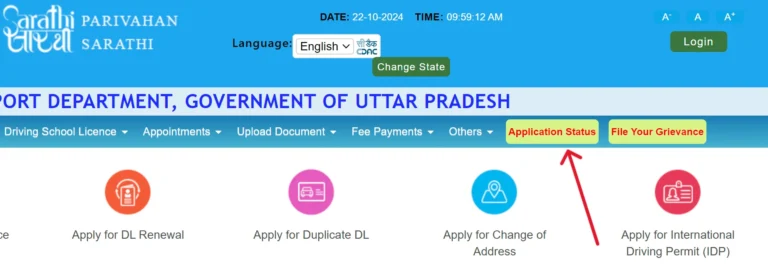
- Click on Application Status in the available menu.
- Enter your application number, date of birth, and the displayed captcha code.
- Click Submit or Check Status to view your application details.
- Review the current status to see whether your application is processing, approved, or requires further action.
Downloading a Driving Licence
You can access your Driving Licence (DL) online through the Sarathi Parivahan portal by following these steps:
- Visit the official Parivahan Sewa website.
- Select Online Services and click on Driving Licence Related Services.
- Choose your state or Union Territory from the available list.
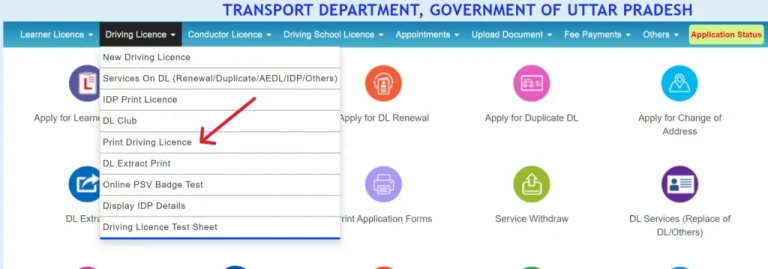
- Look for the option to download or print your driving licence, if available.
- Enter the required details, such as your driving licence number, date of birth, or application number.
- Complete any verification process and submit the requested information.
- If the portal provides a download option, save the available licence document as a PDF or print it for your records.
- Alternatively, access your digital driving licence through DigiLocker or the mParivahan app, where supported.
Know Your Vehicle Details
Use the Vahan National Register Portal’s “Know Your Vehicle Details” service with your vehicle registration number. Follow these steps:
- Go to Vahan National Register Portal https://vahan.parivahan.gov.in/nrservices/.
- Click on “Know Your Vehicle Details” section.
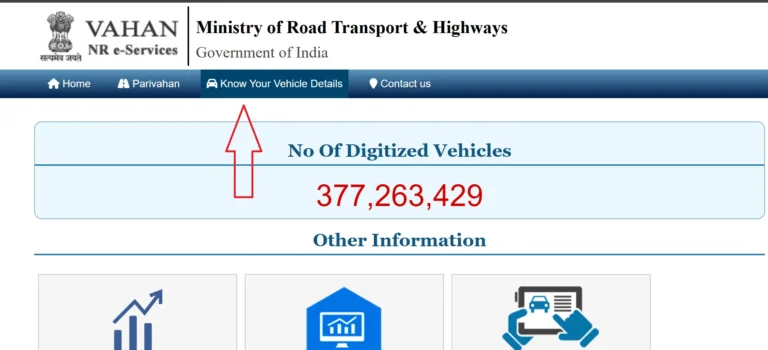
- Click on “Create account”. Add your mobile number and verify OTP.
- Add OTP code, password and submit.
- Log In:
- Click on “Login” enter your mobile number/password or OTP.
- Submit to access the dashboard.
- Access Vehicle Details:
- Click on “Know Your Vehicle Details.”
- Enter vehicle registration number (e.g., DL01AB1234).
- Enter the captcha code.
- Click “Vahan Search.”
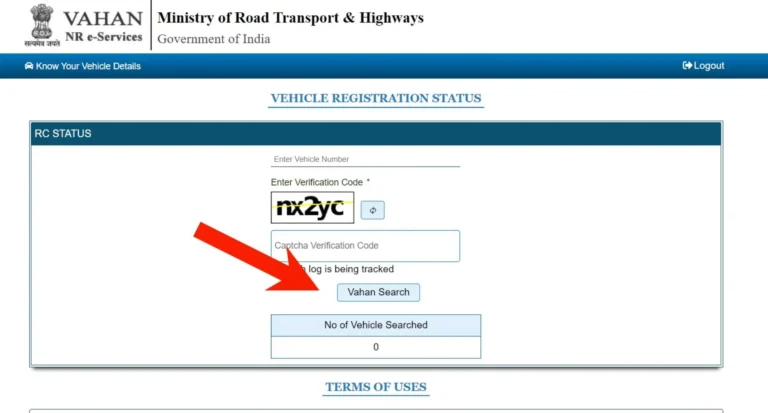
- View Details:
- Registration: Number, date, RTO.
- Owner: Name (partially masked).
- Vehicle: Make, model, fuel, engine/chassis number.
- Status: Registration validity, fitness expiry.
- Insurance: Policy number, expiry.
- PUC: Pollution certificate status.
- Tax: Payment status.
- Permit: Type, validity (if applicable).
Helpline
| Service | Contact Number | Helpline Timing | |
|---|---|---|---|
| Driving Licence / Sarathi | +91-120-2459169 | 6:00 AM–10:00 PM | [email protected] |
| Vehicle Registration / VAHAN | +91-120-4925505 | 6:00 AM–10:00 PM | [email protected] |
| E-Challan Support | +91-120-4925505 | 6:00 AM–10:00 PM | [email protected] |
| mParivahan Support | Check official contact page | Not specified | [email protected] |
| General Parivahan Enquiries | +91-120-4925505 | 6:00 AM–10:00 PM | Refer to the official contact page |
Sarathi, DigiLocker and mParivahan
These platforms serve related but distinct purposes.
- Sarathi focuses on driving licence applications and licensing transactions.
- DigiLocker allows users to access eligible digital documents through its official platform.
- mParivahan provides mobile access to selected transport-related services and information.
If you need to apply for or update a licence, start with the licensing portal. If you need to access an eligible digital document, check the official DigiLocker or mParivahan service and confirm whether your document is available there.
Use only official apps and websites. Do not assume that a document shown in one service automatically replaces every document or verification requirement in another process.
How Much Does a Driving Licence Cost?
The total amount depends on the service, vehicle category, test requirements, and applicable additional charges.
The central government publishes a licensing fee schedule. However, you should confirm the amount displayed for your own transaction on the official portal, since user charges and other applicable requirements may affect the total.
Save your payment receipt. It can help you verify a transaction or resolve a payment issue later.
Frequently Asked Questions
Is Sarathi Parivahan an official government portal?
Yes. The official licensing portal operates within India’s government transport-service system. Use the official domain and avoid unfamiliar sites that request unnecessary personal details or payments.
Can I apply for a driving licence online?
You can start many licence-related applications online. However, some services require a test, document verification, or an RTO visit. Follow the instructions for your state.
How can I check my application status?
Select your state on the official portal, open Application Status, and enter the required application details.
Can I download my driving licence online?
Some states provide options to print or access eligible licence documents online. The available option depends on the service and state. Check the official portal for the current instructions.
What should I do if the portal does not show my state?
Confirm that you are using the official portal. If your state remains unavailable, contact its transport department for guidance.
Can I correct information after submitting an application?
Some applications may offer limited editing options, but others require help from the licensing authority. Contact the relevant office if the portal does not provide a correction option.
What happens if my online payment fails?
Check the payment status before trying again. Keep the bank transaction details and follow the portal’s verification instructions to avoid unnecessary duplicate payments.
Do all states offer the same services?
No. States can enable different services and follow different procedures. Always read the instructions displayed after selecting your state.
Conclusion
The official licensing portal provides a convenient starting point for learner’s licence applications, permanent driving licences, renewals, status checks, fee payments, and other services.
Before applying, check the eligibility rules, documents, and current fees for your service. Save your application number and receipts, and use the official helpdesk or RTO when the portal cannot resolve a problem. For the latest available services, visit https://sarathi.parivahan.gov.in/ and follow the instructions for your state.